
Table of Contents

- 1. NetSuite Data Integration Tools for Automation & Reporting
- 2. Top 5 NetSuite Reporting Tools in 2026: Boost Your Analytics Game
- 3. Top 10 NetSuite Apps for Integration & Reporting for 2026
- 4. Best 6 NetSuite Connectors in 2025
- 5. Best HubSpot NetSuite Integration Software
- 6. Best NetSuite Salesforce Integration Software
-
7. Best NetSuite Snowflake Integration Software
- Purpose of your NetSuite Snowflake integration
- Ways to integrate NetSuite and Snowflake
- Method 1: NetSuite SuiteAnalytics Connect with Snowflake native loaders
- Method 2: Coefficient - no-code spreadsheet connector
- Method 3: Enterprise integration platforms (iPaaS) & custom development
- Connect your data warehouse and ERP in minutes
- 8. Best NetSuite QuickBooks Integration Software
- 9. Best Zendesk NetSuite Integration Software
- 10. Best Zoho CRM NetSuite Integration Software
- 11. Best NetSuite Pipedrive Integration Software
- 12. Best SharePoint NetSuite Integration Software
- 13. Best Google Drive NetSuite integration software
- 14. Best Shopify NetSuite Integration Software
- 15. Best Stripe NetSuite Integration Software
- 16. Best Chargebee NetSuite Integration Software
- 17. Best WooCommerce NetSuite Connector
- 18. Best BigCommerce NetSuite Integration Software
- 19. Best BambooHR NetSuite Integration Software
- 20. Best Klaviyo NetSuite integration software
- 21. Best Mailchimp NetSuite integration software
- 22. Best Square NetSuite Integration Software
- 23. Best NetSuite Gmail Integration Software
- 24. How to Connect NetSuite to Snowflake: A Step-by-Step Guide


Your data analytics team spends days building Snowflake models only to discover the NetSuite financial data they’re analyzing is already a week old—rendering forecasts questionable and executive dashboards outdated. Most teams waste countless hours on manual CSV exports, maintaining brittle Python scripts, or wrestling with expensive ETL platforms that take weeks to configure.
This guide shows you how to connect NetSuite and Snowflake for real-time financial intelligence, automated data pipelines, and reliable analytics workflows. We’ll compare no-code spreadsheet connectors, purpose-built data integration platforms, and enterprise ETL solutions so you can choose the right approach based on your data volume, technical resources, and analytics requirements.
Purpose of your NetSuite Snowflake integration
Integrating NetSuite with Snowflake connects your ERP’s transactional backbone with your data warehouse’s analytical power. The right integration creates a live data pipeline between systems, enabling use cases like:
- FP&A modeling and variance analysis: Combine NetSuite actuals with Snowflake planning models for accurate rolling forecasts
- Cross-system executive reporting: Pull consolidated data from Snowflake’s unified warehouse enriched with real-time NetSuite context
- Data warehouse operations: Sync NetSuite transactions into Snowflake alongside Salesforce, Shopify, and other business systems
- Multi-platform business intelligence: Join financial data from NetSuite with customer, sales, and operations data living in Snowflake
Ways to integrate NetSuite and Snowflake
You have three main approaches:
- Native integration using NetSuite SuiteAnalytics Connect and Snowflake loaders
- Spreadsheet-based connectors like Coefficient that bridge both systems through Google Sheets or Excel
- Enterprise iPaaS platforms and custom development for large-scale data pipelines
Method 1: NetSuite SuiteAnalytics Connect with Snowflake native loaders
NetSuite SuiteAnalytics Connect is an ODBC/JDBC driver that enables SQL queries directly against NetSuite’s data model. Combined with Snowflake’s native data loading capabilities, this creates a direct path from ERP to data warehouse without middleware.
How it works
You purchase the NetSuite SuiteAnalytics module, which provides ODBC driver access to a read-only version of your NetSuite data. Data engineers connect to this endpoint using SQL tools, run extraction queries, and load results into Snowflake using Snowpipe or external tables.
The workflow typically involves:
- Scheduling queries through orchestration tools like Apache Airflow or dbt
- Extracting incremental updates from NetSuite
- Loading them into Snowflake’s staging tables
Your data team then applies transformation logic to conform the data to your warehouse schema.
SuiteAnalytics offers better performance and reliability compared to NetSuite’s older REST APIs, particularly for incremental data extraction. It’s the recommended approach from NetSuite for modern data warehouse integration.
Key benefits
Direct data access without middleware. Your data engineers query NetSuite directly using standard SQL syntax, eliminating:
- Dependencies on third-party connectors
- API rate limits
- Vendor lock-in beyond NetSuite itself
SQL-based extraction familiar to data teams. If your organization already has data engineering resources comfortable with SQL and ETL patterns, SuiteAnalytics provides a straightforward technical approach. Standard ODBC connectivity means compatibility with most data pipeline tools.
Good for teams with existing infrastructure. Organizations that have already invested in SuiteAnalytics licenses and built data engineering teams can leverage these existing resources. The marginal cost of adding Snowflake to your stack is primarily compute and storage.
No per-row pricing concerns. Unlike some iPaaS platforms that charge based on data volume, SuiteAnalytics operates on a fixed license model. This makes costs predictable even as your data volumes grow.
Limitations
Requires additional NetSuite licensing. SuiteAnalytics isn’t included in standard NetSuite plans. Organizations must purchase this module separately, which can add significant cost to your NetSuite contract depending on your edition and user count.
Read-only access with no write-back capability. You can extract data from NetSuite but can’t push insights or updates back into your ERP. This one-way flow means separate processes are needed for any reverse ETL use cases.
Manual pipeline orchestration needed. You’re responsible for:
- Building and maintaining the extraction logic
- Scheduling, error handling, and monitoring
- Owning breaking changes when NetSuite updates its schema or Snowflake changes how it handles certain data types
Technical setup complexity. This approach assumes you have data engineers who can write SQL, configure ODBC connections, build ETL pipelines, and troubleshoot connection issues. For finance teams without dedicated engineering resources, the learning curve is steep.
Best for
SuiteAnalytics Connect works well for enterprises that already have the SuiteAnalytics license, employ data engineering teams comfortable with ETL development, and need full control over their extraction logic and transformation patterns.
Method 2: Coefficient – no-code spreadsheet connector
Coefficient offers a different approach entirely: connecting both NetSuite and Snowflake through the spreadsheet layer where your finance and analytics teams already work.
How it works
Instead of building data pipelines, you connect Coefficient to both your Snowflake warehouse and NetSuite ERP directly from Google Sheets or Excel.
The tool provides native connectors for both systems, letting you import live data from either source into spreadsheet tabs.
For Snowflake, you can:
- Use Coefficient’s visual query builder to select tables and columns
- Write custom SQL queries
- Leverage their GPT SQL Builder that translates natural language requests into optimized SQL
The data preview shows you the first 50 rows before committing, and you can apply filters, sorting, and row limits.

From NetSuite, you pull financial data using similar point-and-click workflows.

Here’s where Coefficient shines for cross-system analytics:
- Have Snowflake data in one tab
- NetSuite actuals in another
- Combine them using standard spreadsheet formulas in a third tab for variance analysis
The workflow for FP&A teams looks like this:
- Import your planning model from Snowflake
- Pull current actuals from NetSuite
- Calculate variances in the spreadsheet
- Optionally export the enriched insights back to Snowflake tables for broader team access
All of this happens in the familiar spreadsheet environment where finance teams are already comfortable.
Key benefits
Dual connector advantage for cross-system analysis. Coefficient is one of the few tools that natively connects both Snowflake and NetSuite in the same interface:
- You’re not juggling multiple platforms or exporting CSVs between systems
- Your FP&A team can build variance reports that combine warehouse models with ERP actuals
- All updating automatically on your chosen schedule
Spreadsheet-native experience finance teams understand. Rather than learning BI tools or writing SQL, your analysts work in Google Sheets or Excel with:
- Familiar formulas, pivot tables, and charts
- Dramatically reduced training time
- Increased adoption rates across your finance organization
Bi-directional sync with both platforms.
Import data from Snowflake and NetSuite, transform it using spreadsheet logic, then export results back to Snowflake tables. This bidirectional capability enables workflows where:
- Business users enrich warehouse data with manual inputs or business context
- Then persist insights back to your data platform
100+ connector ecosystem beyond just these two systems.
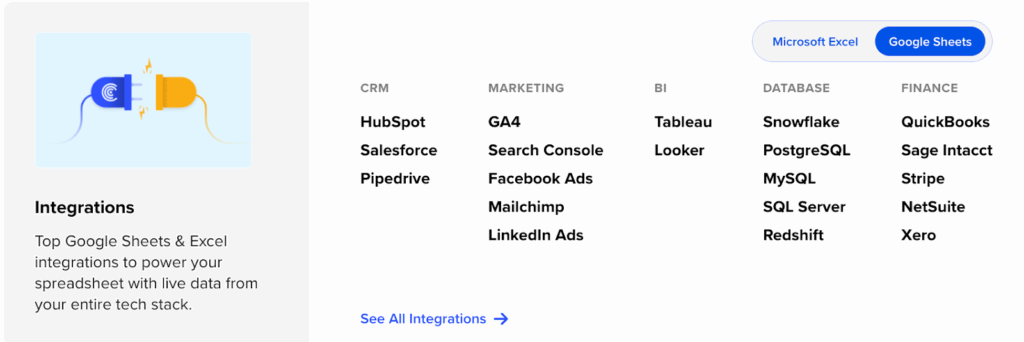
The same Coefficient subscription gives you access to connectors for:
- Salesforce, QuickBooks, Shopify
- Google Analytics, and dozens more
- Join NetSuite financial data with Salesforce opportunity data and Snowflake’s consolidated metrics—all in one spreadsheet
For organizations running modern data stacks, this cross-platform flexibility is invaluable.
Minutes to setup versus weeks for enterprise pipelines. You can:
- Connect both systems
- Run your first query
- Share results with your team in under an hour
Compare that to the typical 2-4 week timeline for configuring iPaaS platforms or the months required for custom ETL development.
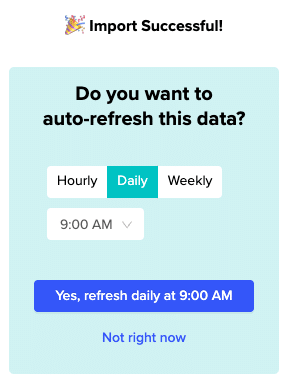
Auto-refresh and scheduling built-in.

Set your imports to refresh hourly, daily, or weekly depending on your needs:
- Coefficient handles the refresh logic, error handling, and notifications
- You can even set up Slack alerts when specific metrics cross thresholds or new rows appear
Cost-effective for analysis workloads.

At $49-$99 per user per month:
- Coefficient costs less than a single data engineer’s hourly rate
- For small to mid-size finance teams who need powerful cross-system analytics without enterprise platform complexity, the ROI is clear
Limitations
Spreadsheet environment constraints. Google Sheets caps at 10 million cells per spreadsheet:
- That’s sufficient for most analysis and reporting use cases (hundreds of thousands of rows)
- It’s not designed for multi-terabyte ETL operations
- If you’re moving TB-scale data volumes, you’ll need purpose-built ETL platforms
Not a replacement for full data pipeline infrastructure. Coefficient excels at importing, analyzing, and exporting data for business users. It’s not designed to:
- Handle complex transformation logic with hundreds of tables
- Maintain historical snapshots
- Orchestrate dependencies between dozens of data jobs
For those enterprise data warehouse requirements, you’ll want traditional ETL tools.
Ratings and reviews
Coefficient holds a 4.7 out of 5 rating on G2 based on 140+ reviews. Users consistently highlight the tool’s ability to:
- “Weave together diverse data sources directly into Google Sheets”
- “Pull live, accurate data into one place instantly”
The platform has earned Leader badges in the Spreadsheet category along with recognition for Best Support.
Reviewers particularly appreciate how Coefficient “transforms complex, multi-platform data juggling into a smooth, almost invisible process”—exactly the promise finance teams need when working across NetSuite and Snowflake.
Best for
Coefficient fits finance and analytics teams who need cross-system analysis without engineering dependencies. It’s ideal for:
- FP&A professionals combining warehouse models with ERP actuals
- Business users who prefer spreadsheets over BI tools
- Organizations with 10K-500K row data volumes who value speed and ease of use over enterprise pipeline complexity
Method 3: Enterprise integration platforms (iPaaS) & custom development
For organizations with large-scale data operations or complex transformation requirements, enterprise iPaaS platforms and custom development provide industrial-grade alternatives.
iPaaS platforms
Fivetran dominates the data warehouse integration space with fully managed ELT pipelines built specifically for Snowflake.
Their NetSuite SuiteAnalytics connector handles:
- Automated schema mapping
- Drift detection
- Continuous replication
It’s zero-maintenance once configured—Fivetran owns the updates when NetSuite changes APIs or Snowflake adjusts how it ingests data.
The tradeoff is their Monthly Active Rows (MAR) pricing model, which calculates cost based on the volume of data moving through your pipelines:
- For mid-size companies syncing millions of NetSuite transactions monthly, costs can quickly reach $2,000-$5,000+ per month
- Fivetran offers a 14-day free trial and a limited free tier for small data volumes, making it easy to test before committing
Celigo brings 15+ years of NetSuite integration expertise to the equation.

Their platform offers:
- Pre-built templates specifically for NetSuite-Snowflake connections
- Reverse ETL capabilities that let you push insights from Snowflake back into NetSuite
- This bidirectional flow is rare in the ETL space and valuable for organizations that need to operationalize warehouse insights
Pricing runs from $600 to $5,000+ monthly depending on:
- Number of endpoints
- Workflows
- Transaction volumes
The Enterprise tier includes unlimited workflows and Premier Support, making it attractive for complex integration environments with multiple NetSuite instances or subsidiaries.
Workato and other enterprise automation platforms round out the iPaaS landscape.
These tools provide:
- Recipe-based integration builders with NetSuite and Snowflake connectors
- Typically starting around $10,000 annually for enterprise features
- Work well when you need to orchestrate complex workflows across many systems beyond just NetSuite and Snowflake
Custom development
For the ultimate in flexibility, organizations build custom pipelines using Python, dbt, and orchestration tools like Apache Airflow or Prefect. This approach:
- Uses NetSuite’s SuiteTalk API for extraction
- Applies custom transformation logic in Python or SQL
- Loads data into Snowflake using their Python connector
Development costs typically run:
- $50,000-$150,000 for initial build-out over 3-6 months
- Plus $2,000-$5,000 monthly for ongoing maintenance and infrastructure
- You’ll also need specialized data engineering talent who understand both NetSuite’s data model and Snowflake’s best practices
The payoff is complete control:
- Optimize for your specific schema requirements
- Handle complex business logic that off-the-shelf tools don’t support
- Avoid per-row or per-connector licensing fees
For very high-volume operations moving terabytes daily, this control and cost structure often makes sense at scale.
The downside is brittleness:
- When NetSuite updates their API structure or changes field names, your pipeline breaks until your team fixes it
- You own all the monitoring, alerting, error handling, and schema evolution logic
- This ongoing maintenance burden is real, which is why many organizations start with custom development but eventually migrate to managed platforms as their data teams mature
Best for
Enterprise iPaaS platforms fit:
- Mid-to-large organizations with dedicated data engineering teams
- High-volume data operations requiring automated schema management
- Budgets that accommodate $1,000-$5,000+ monthly for managed pipelines
Custom development works for:
- Large enterprises with unique transformation requirements
- In-house data engineering talent
- Use cases where control and optimization outweigh the development and maintenance costs
Connect your data warehouse and ERP in minutes
Your Snowflake warehouse holds powerful analytics, and your NetSuite ERP contains your financial truth. The gap between them shouldn’t require weeks of engineering work or expensive enterprise platforms just to answer basic questions about variances and trends.
Start with Coefficient’s free trial to connect both systems through spreadsheets in under an hour. Import live data from your Snowflake models, enrich it with NetSuite actuals, and share insights with your team—all without leaving Google Sheets or Excel.