
Table of Contents

- 1. NetSuite Data Integration Tools for Automation & Reporting
- 2. Top 5 NetSuite Reporting Tools in 2026: Boost Your Analytics Game
- 3. Top 10 NetSuite Apps for Integration & Reporting for 2026
- 4. Best 6 NetSuite Connectors in 2025
- 5. Best HubSpot NetSuite Integration Software
- 6. Best NetSuite Salesforce Integration Software
- 7. Best NetSuite Snowflake Integration Software
- 8. Best NetSuite QuickBooks Integration Software
- 9. Best Zendesk NetSuite Integration Software
- 10. Best Zoho CRM NetSuite Integration Software
- 11. Best NetSuite Pipedrive Integration Software
- 12. Best SharePoint NetSuite Integration Software
- 13. Best Google Drive NetSuite integration software
- 14. Best Shopify NetSuite Integration Software
-
15. Best Stripe NetSuite Integration Software
- Purpose of your Stripe NetSuite integration
- Ways to integrate Stripe and NetSuite
- Method 1: Stripe's official NetSuite connector
- Method 2: Coefficient - no-code spreadsheet connector
- Method 3: Enterprise integration platforms (iPaaS) & custom development
- Connect your payment and finance systems today
- 16. Best Chargebee NetSuite Integration Software
- 17. Best WooCommerce NetSuite Connector
- 18. Best BigCommerce NetSuite Integration Software
- 19. Best BambooHR NetSuite Integration Software
- 20. Best Klaviyo NetSuite integration software
- 21. Best Mailchimp NetSuite integration software
- 22. Best Square NetSuite Integration Software
- 23. Best NetSuite Gmail Integration Software
- 24. How to Connect NetSuite to Snowflake: A Step-by-Step Guide


How long does it take your finance team to reconcile yesterday’s Stripe payments in NetSuite? Hours? Days? For most companies, payment data sits in Stripe while finance teams manually export CSVs, reformat columns, and import transactions batch by batch. The result: reconciliation backlogs that delay financial close, obscure real-time cash position, and create audit headaches when payment timing doesn’t match deposit timing.
The gap between payment processing and accounting systems forces finance teams into reactive mode. You’re always playing catch-up, never working with current data, and spending valuable time on data transfer instead of analysis.
Purpose of your Stripe NetSuite integration
Connecting Stripe with NetSuite eliminates manual reconciliation work and gives finance teams real-time visibility into payment activity. Here’s what integration enables:
- Automated payment reconciliation: Stripe transactions flow into NetSuite automatically, matching payments to invoices without manual data entry
- Accurate cash flow visibility: Real-time payment data updates NetSuite’s cash position immediately, not days later after manual imports
- Faster financial close: Eliminate end-of-month reconciliation marathons by keeping payment data synced continuously throughout the month
- Multi-system reporting: Combine Stripe payment metrics with NetSuite financial data for complete revenue analysis and forecasting
Ways to integrate Stripe and NetSuite
You have three main approaches for connecting these systems:
- Stripe’s official enterprise connector automates accounting workflows for companies heavily invested in their payment ecosystem.
- No-code platforms like Coefficient let finance teams build cross-platform dashboards without developer resources.
- iPaaS solutions and custom development handle complex, multi-directional workflows when pre-built options don’t fit your requirements.
Each approach serves different business needs, budgets, and technical capabilities. Let’s examine how they work and where each makes sense.
Method 1: Stripe’s official NetSuite connector
Stripe offers an enterprise-grade native integration called the Stripe Connector for NetSuite (formerly SuiteSync, which Stripe acquired). This first-party solution provides comprehensive payment reconciliation and accounting automation designed specifically for the Stripe-NetSuite workflow.

How it works
The connector syncs payment data from Stripe to NetSuite in near real-time, creating corresponding accounting records automatically.
Transaction automation:
- When a payment processes through Stripe, the connector creates or updates the customer record in NetSuite
- Generates the appropriate invoice or cash sale transaction
- Reconciles the payment to the correct bank deposit—including fees, currency conversion, and transaction-level detail
Subscription and exception handling:
- For subscription businesses, the integration supports NetSuite’s revenue recognition system, providing the data structure needed for ASC 606 compliance
- Disputes, refunds, and chargebacks flow through automatically with proper accounting treatment, eliminating manual journal entries for these exceptions
The connector includes workflow options for different business models: invoice automation for B2B companies, ecommerce cash sales for online retailers, customer payment pages for collections, and scheduled payments that charge saved cards on invoice due dates. Implementation requires working with an official Stripe partner who configures the integration for your specific accounting requirements.
Key benefits
- Complete accounting automation: The connector handles the full payment lifecycle—authorization, capture, settlement, reconciliation, and deposit matching. Finance teams don’t touch individual transactions. Everything from customer creation to bank reconciliation happens automatically based on Stripe activity.
- Bank reconciliation included: Most integrations stop at creating NetSuite records. Stripe’s connector goes further by matching transactions to actual bank deposits with transaction-level detail. You see exactly which charges, refunds, and fees make up each deposit amount, making bank reconciliation straightforward instead of mysterious.
- Multi-entity and multi-currency support: Companies with complex structures get proper subsidiary assignment and currency handling built in. The connector manages currency conversion, conversion fees, and foreign exchange gains/losses automatically—critical for international businesses where payment currency differs from accounting currency.
- Revenue recognition foundation: For subscription businesses, the integration provides the invoice line item data NetSuite’s RevRec system needs. You get proper deferred revenue treatment, automated amortization schedules, and compliance-ready revenue reporting without manual revenue allocation.
- Tested and maintained by Stripe: As a first-party integration, Stripe maintains the connector when either platform’s API changes. You’re not dependent on a third-party vendor’s update cycle or hoping they’ll support new Stripe features quickly.
Limitations
The connector serves enterprise customers with implementation budgets and IT resources.
- The free tier only handles payment pages without data sync—full automation requires the paid version with enterprise pricing (not publicly disclosed)
- Setup involves working with a Stripe implementation partner rather than self-serve installation, adding time and cost to deployment
The integration connects Stripe to NetSuite exclusively. If you process payments through multiple gateways (Stripe, Square, PayPal, etc.), you’ll need separate integrations for each processor. Companies seeking consolidated payment reporting across all gateways won’t get that from the native connector alone.
Ratings and reviews
Users on SuiteApp.com rate the Nova Module implementation 5 out of 5 stars across multiple reviews.
What customers say:
- One finance director wrote: “This SuiteApp has been working well for us and we sync a high volume of transactions”
- Another reviewer noted: “I would 100% recommend working with Nova Module for integrating Stripe and NetSuite. The efficiencies we have gained…have been very impactful for our small finance team”
The consistent praise focuses on implementation quality, reliability with high transaction volumes, and the time savings from eliminating manual reconciliation work.
Best for
Stripe’s native connector fits companies where Stripe is the primary or sole payment processor, who have budget for enterprise integration solutions, need ASC 606 revenue recognition capabilities, process high transaction volumes that make manual reconciliation impractical, or require multi-currency and multi-subsidiary accounting support.
It’s the strongest option when your payment processing strategy centers on Stripe’s ecosystem.
Method 2: Coefficient – no-code spreadsheet connector
Coefficient takes a different approach: instead of automating NetSuite record creation, it connects both Stripe and NetSuite to spreadsheets where finance teams already work. This no-code platform pulls live data from 100+ business systems—including both Stripe and NetSuite—into Google Sheets or Excel for analysis, reporting, and reconciliation.
How it works
Connect Both Systems to Google Sheets or Excel in Minutes:
Coefficient’s no-code platform pulls live data from both Stripe and NetSuite directly into your spreadsheets through simple point-and-click imports.
Quick Integration Walkthrough:
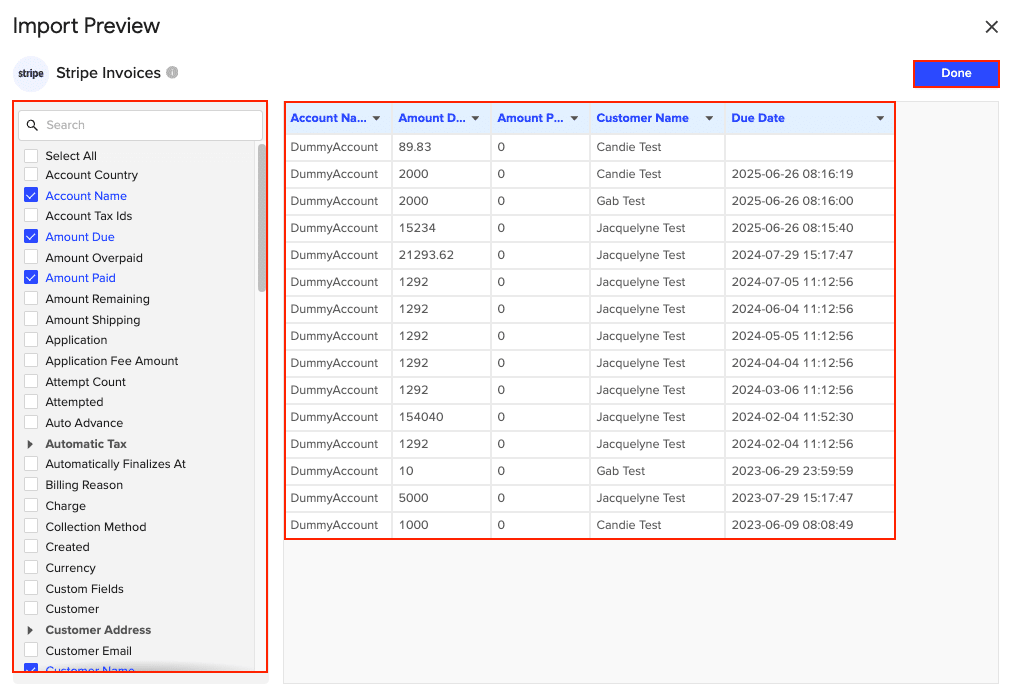
- Import live data from Stripe – Pull charges, customers, invoices, subscriptions, balance transactions, payouts, and disputes using pre-built import templates or custom filters
- Import live data from NetSuite – Access records, saved searches, reports, or custom SuiteQL queries to bring in AR data, GL accounts, and customer records

- Combine and analyze data from both sources in one spreadsheet – Use VLOOKUP or INDEX/MATCH formulas to reconcile Stripe payments against NetSuite invoices
- Build custom dashboards, pivot tables, charts, and financial models – Create payment reconciliation reports, cash flow analysis, and revenue dashboards with real-time data
- Schedule auto-refresh (hourly, daily, weekly) to keep data current without manual exports – Set your reconciliation reports to update automatically before your daily finance review

Key benefits
- Multi-system reporting capability: The real advantage shows up when you need visibility across more than just Stripe and NetSuite. Finance teams typically work with multiple payment processors (Stripe, Square, PayPal), multiple data warehouses, CRM systems, and various SaaS tools. Coefficient connects them all in one place. You can analyze Stripe payments alongside Square POS transactions, compare them to Salesforce bookings, and reconcile everything against NetSuite GL—all in one dashboard.
- Finance team control: No IT tickets, no developer sprints, no waiting for the integration backlog. Finance professionals with spreadsheet skills can build their own data connections and reports. When you need a new reconciliation report or want to analyze data differently, you modify the spreadsheet yourself in minutes, not weeks.
- Cost-effective for cross-platform needs: At $49-$99 per month, Coefficient costs 10-150x less than iPaaS platforms that run $600-$7,800+ monthly. For companies needing visibility across multiple systems rather than automated transaction processing, this pricing difference makes sophisticated reporting accessible without enterprise integration budgets.
- Flexible reconciliation workflows: Different finance teams reconcile differently. Coefficient adapts to your workflow instead of forcing you into predefined processes. Pull the data fields you need, structure matching logic how you prefer, add manual review steps where appropriate, and export results however your team works. The flexibility matters during close when you need quick answers to specific questions.
- Quick implementation: Most finance teams are productive within hours or days, not months. There’s no professional services engagement, no implementation partner, no complex mapping configuration. Install the add-on, connect your accounts, build your first report. The learning curve matches typical spreadsheet complexity—familiar territory for finance professionals.
Limitations
Coefficient is a reporting and analysis tool, not a transactional automation platform.
- It doesn’t create NetSuite records automatically, doesn’t post journal entries, and doesn’t handle the accounting mechanics of payment processing
- You’re pulling data for visibility and reconciliation, not automating the record creation process
Data refresh considerations:
- Data refresh frequency is scheduled, not instant—you can set hourly refreshes, but you won’t get real-time updates the moment a Stripe payment processes
- For most finance workflows (daily reconciliation, weekly analysis, monthly close), scheduled refreshes work fine
- For scenarios requiring instant transaction processing, native integrations serve better
Reconciliation still involves human review.
Coefficient eliminates manual data export and import, but finance teams still review match results, investigate discrepancies, and make decisions about exceptions. The tool accelerates the process significantly but doesn’t remove human judgment from reconciliation workflows.
Ratings and reviews
- G2 ranks Coefficient #2 in Big Data Integration Tools and #3 in Data Extraction in their Fall 2024 reports. Users awarded the platform “Best Relationship” recognition and rated it a Momentum Leader and High Performer across mid-market, enterprise, and Asia Pacific segments.
- One reviewer wrote: “Coefficient’s effortless ability to weave together diverse data sources directly into Google Sheets creates a dynamic, unified workspace that transforms complex multi-platform data juggling into a smooth process.” The consistent theme in reviews emphasizes the platform’s ability to connect multiple systems without technical complexity.
Best for
Coefficient serves finance teams needing visibility across multiple systems (not just Stripe + NetSuite), companies wanting reconciliation dashboards without custom development costs, organizations with limited IT resources where finance teams must be self-sufficient, businesses requiring flexible ad-hoc reporting that changes frequently, and teams seeking alternatives to expensive iPaaS platforms for reporting use cases.
It’s particularly valuable when your payment data spans multiple processors and you need consolidated views.
Learn more: Coefficient | Stripe integration
Method 3: Enterprise integration platforms (iPaaS) & custom development
When pre-built solutions don’t match your workflow requirements, iPaaS platforms and custom development provide maximum flexibility at significantly higher cost and complexity.
iPaaS platforms
Celigo offers a Stripe-NetSuite integration app built on their enterprise iPaaS platform.

Core capabilities:
- The solution includes bi-directional customer and invoice sync, payment application, and payout reconciliation automation
- Celigo’s strength lies in handling complex data flows with extensive field mapping capabilities and customization options
- Their monitoring dashboard provides real-time visibility into integration performance with error resolution tools
- Companies with high transaction volumes and unique workflow requirements often choose Celigo for its scalability and flexibility
Workato brings its enterprise automation platform to the Stripe-NetSuite connection, integrating both systems within their 1,000+ app ecosystem.

- The NetSuite Certified connector ensures proper API handling
- Workato’s recipe-based automation framework lets technical teams build complex workflows connecting multiple systems beyond just payments and accounting
- The platform serves enterprises with sophisticated integration needs spanning many departments and systems
Investment considerations:
- Both platforms require technical resources to configure
- Charge enterprise pricing ($600-$7,800+ monthly typical, based on transaction volume and complexity)
- Involve longer implementation timelines than no-code alternatives
- However, they provide the power and flexibility that complex businesses need when simple integrations won’t work
Custom development
Building a custom Stripe-NetSuite integration gives you complete control over functionality, workflow logic, and user experience.
Costs and timeline:
- Development projects typically cost $25,000-$250,000+ with 3-6 month timelines
- Plus ongoing maintenance costs of $10,000-$30,000+ annually as APIs evolve and business requirements change
When custom makes sense:
- You have truly unique business logic that no pre-built integration supports
- Need to integrate legacy systems alongside Stripe and NetSuite
- Have in-house development teams to maintain custom code long-term
- Require specific compliance features unavailable in commercial solutions
The risk lies in ongoing maintenance burden and knowledge dependency. Custom integrations break when APIs change, require developer resources you may not have later, and create technical debt that makes future system changes more complex.
Best for
iPaaS platforms serve companies with complex, multi-system workflows beyond basic payment sync, high customization requirements for field mapping and business rules, enterprise scale with corresponding integration budgets, and technical teams to manage platform configuration and maintenance.
Custom development fits organizations with unique requirements that truly can’t be met with commercial solutions, in-house development capabilities for ongoing maintenance, budget for substantial upfront and ongoing investment, and patient stakeholders who can wait months for implementation while accepting the maintenance responsibility.
Connect your payment and finance systems today
Stripe payment data doesn’t have to sit in CSV files until someone manually imports it. Native connectors, no-code platforms, and enterprise integration tools all eliminate that manual bottleneck—choosing the right one depends on whether you need automated accounting workflows, cross-platform reporting visibility, or complex custom automation.
For most finance teams, the question isn’t whether to integrate, but which approach matches your technical resources, budget, and reporting requirements. Start by mapping your actual workflow: Are you automating transaction processing or building reconciliation dashboards? Connecting one payment processor or consolidating multiple sources? Those answers point you toward the right solution.
Ready to eliminate manual payment reconciliation? Get started with Coefficient to connect Stripe, NetSuite, and 100+ other systems in the spreadsheets where your finance team already works.