
Table of Contents

- 1. NetSuite Data Integration Tools for Automation & Reporting
- 2. Top 5 NetSuite Reporting Tools in 2026: Boost Your Analytics Game
- 3. Top 10 NetSuite Apps for Integration & Reporting for 2026
- 4. Best 6 NetSuite Connectors in 2025
- 5. Best HubSpot NetSuite Integration Software
- 6. Best NetSuite Salesforce Integration Software
- 7. Best NetSuite Snowflake Integration Software
- 8. Best NetSuite QuickBooks Integration Software
- 9. Best Zendesk NetSuite Integration Software
- 10. Best Zoho CRM NetSuite Integration Software
- 11. Best NetSuite Pipedrive Integration Software
- 12. Best SharePoint NetSuite Integration Software
-
13. Best Google Drive NetSuite integration software
- Purpose of your Google Drive NetSuite integration
- Ways to integrate Google Drive and NetSuite
- Why there's no native integration
- Method 2: Coefficient - no-code spreadsheet connector
- Method 3: Enterprise integration platforms (iPaaS) and custom development
- Connect your financial data and documents today
- 14. Best Shopify NetSuite Integration Software
- 15. Best Stripe NetSuite Integration Software
- 16. Best Chargebee NetSuite Integration Software
- 17. Best WooCommerce NetSuite Connector
- 18. Best BigCommerce NetSuite Integration Software
- 19. Best BambooHR NetSuite Integration Software
- 20. Best Klaviyo NetSuite integration software
- 21. Best Mailchimp NetSuite integration software
- 22. Best Square NetSuite Integration Software
- 23. Best NetSuite Gmail Integration Software
- 24. How to Connect NetSuite to Snowflake: A Step-by-Step Guide


Your auditor needs last quarter’s invoices, so you spend two hours scrolling through Google Drive folders, cross-referencing NetSuite transactions, and manually matching documentation—a task that should take five minutes if your systems were connected. This disconnect between financial data in NetSuite and supporting documents in Google Drive creates daily headaches for finance teams managing audit requests, compliance reviews, and document retrieval.
This guide shows you how to connect Google Drive and NetSuite to automate document attachment, create searchable audit trails, and ensure every transaction links to its supporting files. We’ll compare native integration options, spreadsheet-based data tools, and enterprise document management platforms so you can choose the right solution based on your document volume and compliance requirements.
Purpose of your Google Drive NetSuite integration
Connecting Google Drive with NetSuite eliminates the friction between where you store documents and where you track financial transactions. Here’s what teams need:
- Invoice reconciliation workflows: Analyze NetSuite invoice data alongside Drive-stored PDF backups for month-end close
- Expense report verification: Cross-reference NetSuite expense transactions with receipt images stored in Drive folders
- Financial document analysis: Combine NetSuite transaction data with spreadsheet analysis of Drive-stored financial documents
- Audit trail management: Track NetSuite financial records while maintaining organized supporting documentation in Drive
- Contract and PO tracking: Link purchase order data in NetSuite with vendor contracts stored in Drive
The challenge? There’s no native integration. Your options are specialized spreadsheet connectors for financial analysis workflows or iPaaS platforms for document automation.
Ways to integrate Google Drive and NetSuite
Since no native integration exists, you have three practical paths. Spreadsheet connectors like Coefficient bring NetSuite financial data into Google Sheets for analysis alongside your Drive documents. iPaaS platforms like Workato or Celigo automate document transfers between systems. Custom development offers complete control for unique workflows.
Why there’s no native integration
Google Drive and NetSuite don’t offer a native integration. Given their fundamentally different purposes, this makes sense.
How the systems differ
Google Drive:
- A cloud storage platform designed for document collaboration and file sharing
- Manages unstructured files organized in folders with sharing permissions
NetSuite:
- An ERP system built for structured financial transactions and business process management
- Manages relational financial data with complex business logic and transaction workflows
These platforms operate on entirely different architectures. There’s minimal architectural overlap that would justify native integration development.
The integration landscape
The good news? Purpose-built integration platforms have filled this gap effectively.
- iPaaS vendors like Workato, Zapier, and Celigo offer pre-configured connectors for automated document workflows
- Spreadsheet tools like Coefficient connect NetSuite financial data to Google Sheets for analysis
- This ecosystem approach actually works well—you get solutions optimized for specific workflow needs rather than a one-size-fits-all integration
Best for: This situation affects every organization connecting these systems. Your choice depends on workflow type—analysis and reporting versus document automation—which we’ll cover next.
Method 2: Coefficient – no-code spreadsheet connector
While Coefficient doesn’t directly connect Google Drive to NetSuite for document automation, it solves a critical challenge many finance teams face: analyzing NetSuite financial data alongside Drive-stored documents.
How Coefficient works for NetSuite financial analysis
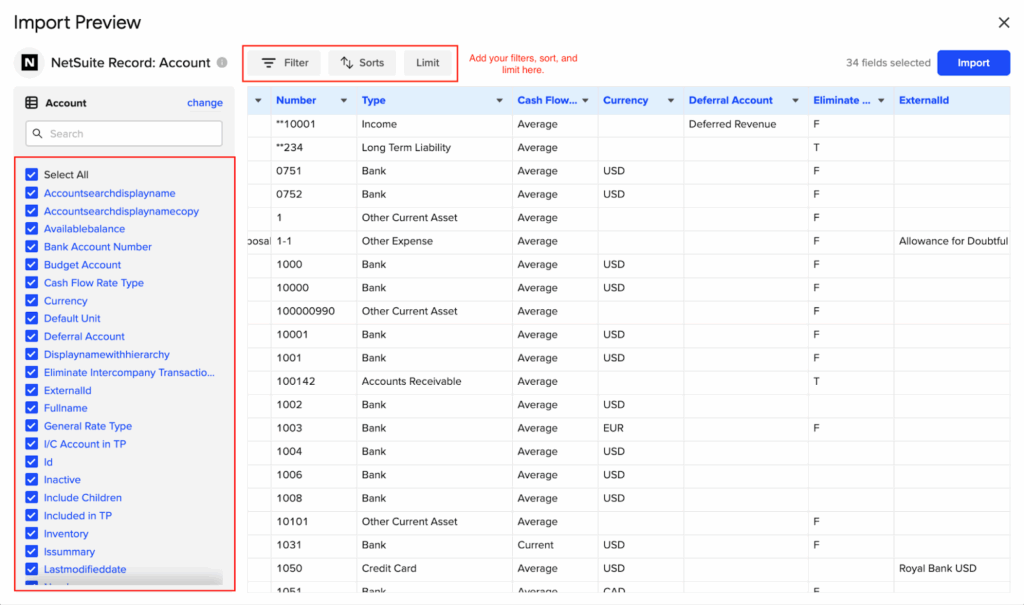
Coefficient brings live NetSuite data directly into Google Sheets through a no-code connector.
Getting started:
- You authenticate via OAuth, select the data you need—invoices, expenses, transactions, customers, vendors
- Coefficient pulls it into your spreadsheet with automatic refresh scheduling
Import methods:
- Import from NetSuite Records & Lists for standard entity data
- Use Saved Searches for custom report configurations
- Pull pre-built Datasets
- Access supported financial reports like Income Statements or General Ledgers
- Write custom SuiteQL queries for advanced data extraction
Once imported, your NetSuite data lives in Google Sheets—part of the same Google Workspace environment as your Drive documents. Finance teams work with live transaction data in spreadsheets while referencing supporting documents stored in adjacent Drive folders. The setup takes minutes, not days, and requires zero coding.
What this means for Drive + NetSuite workflows
Here’s the practical workflow: You store invoice PDFs, expense receipts, and financial documents in organized Google Drive folders. Your transaction data lives in NetSuite. Coefficient connects the financial data side by bringing NetSuite records into Google Sheets.
The workflow in action:
- You can now analyze invoice transactions from NetSuite in a spreadsheet while opening corresponding invoice PDFs from your Drive folder in another browser tab
- Month-end reconciliation becomes straightforward—NetSuite numbers in columns A through K, your notes and calculations in columns L through Z, Drive document links in a reference column
This isn’t document automation. Coefficient won’t move files between Drive and NetSuite automatically. But for finance teams whose primary need is analyzing and reconciling financial data against supporting documents, working directly in spreadsheets often beats building complex automation workflows.

Key benefits
- Live data without manual exports: Schedule automatic refreshes hourly, daily, or weekly. Your NetSuite data updates in Sheets without anyone touching an export button. No stale snapshots, no version control headaches.
- Spreadsheet-native analysis: Finance teams live in spreadsheets. Coefficient meets them there. You get pivot tables, formulas, conditional formatting, and charts working directly on live NetSuite data. Add custom calculations, notes, and cross-references as needed.
- No-code setup: The entire connection flow happens through a sidebar interface. Select NetSuite from the connector list, authenticate, choose your data, configure refresh schedules. Finance teams can set this up independently without submitting IT tickets.
- 70+ connector ecosystem: Beyond NetSuite, connect Salesforce, HubSpot, Shopify, QuickBooks, Snowflake, and dozens of other systems. Build comprehensive financial analysis combining data from multiple sources in one spreadsheet.
- Cost-effective for reporting workflows: At $59-$99 per user per month, Coefficient costs significantly less than enterprise iPaaS platforms ($10,000-$30,000+ annually) for teams primarily focused on financial analysis and reporting rather than document automation.
Limitations
No Google Drive connector: Coefficient doesn’t connect to Google Drive. It won’t automatically upload NetSuite documents to Drive or attach Drive files to NetSuite records. Document automation requires different tools.
Analysis-focused, not automation-focused: This solution excels at bringing data into spreadsheets for human analysis. If you need fully automated document workflows triggered by NetSuite events, iPaaS platforms better fit that use case.
Ratings and user feedback
Coefficient earned impressive recognition in G2’s Fall 2024 reports, ranking #2 in Big Data Integration and #3 in Data Extraction Tools. The platform received the Best Relationship award, highlighting strong customer support, and achieved High Performer status across mid-market, enterprise, and Asia Pacific regions.
Users consistently praise the ease of setup and the ability to work with live data directly in familiar spreadsheet environments. The common feedback pattern: finance teams love eliminating manual data exports while maintaining the analytical flexibility spreadsheets provide.
Best for: Finance teams who store invoices, expense receipts, and supporting financial documents in Google Drive and need to analyze or reconcile them against NetSuite transaction data within spreadsheets. Ideal for financial reporting, month-end close, and analysis workflows where document automation isn’t the primary requirement.
Method 3: Enterprise integration platforms (iPaaS) and custom development
When your workflow requires automated document transfers—not just data analysis—iPaaS platforms and custom development become the right solutions.
iPaaS platforms for document automation
Integration Platform as a Service (iPaaS) vendors specialize in automated workflows between cloud applications. For Google Drive and NetSuite, these platforms detect NetSuite events, process data, and trigger corresponding Drive actions without human intervention.
Workato leads the enterprise space with over 1,200 connectors and sophisticated workflow capabilities.

- The platform earned 4.7 out of 5 stars on G2 across 600+ reviews with 99% user satisfaction
- You can build complex automation like: when NetSuite approves an invoice over $10,000, generate a PDF, check if a customer folder exists in Drive (create if not), upload the file with specific naming conventions, set permissions, and send email notifications
- Pricing starts around $10,000 annually for enterprise plans, positioning it for mid-market and large organizations
Zapier brings integration to smaller businesses with 7,000+ app connections and straightforward no-code automation.

- At $19.99 per month for 750 tasks, it’s the most accessible entry point
- The platform maintains 4.5/5 stars across 1,000+ G2 reviews
- Users love the simplicity—new NetSuite invoice creates Drive folder, updated transaction uploads file
- The trade-off comes in less sophisticated error handling and simpler data transformation compared to enterprise platforms
Celigo offers specialized NetSuite expertise, built by former NetSuite engineers who understand the platform’s data structures and quirks intimately.

- This deep knowledge accelerates implementation and reduces troubleshooting
- Celigo holds 4.4/5 stars across 500+ G2 reviews, with NetSuite customers specifically highlighting pre-built templates that handle common ERP integration patterns
- Pricing typically ranges from $15,000-$30,000+ annually depending on workflow complexity
Custom development with REST APIs
For organizations with unique workflows or long-term cost optimization goals, custom development using NetSuite’s REST API and Google Drive’s API offers complete control.
The approach:
- Build middleware—typically a Node.js, Python, or Java application hosted in the cloud
- Monitor NetSuite for specific events, process the data according to your business logic, and perform corresponding Google Drive actions
- You might build a system where invoice approval triggers PDF generation, validates folder structure based on customer attributes, applies granular permissions by department, and maintains detailed audit logs
This level of customization often exceeds what pre-built iPaaS templates support.
Cost comparison:
- An enterprise iPaaS platform might cost $15,000 annually with per-transaction fees that scale with volume
- Custom development might require $25,000 upfront for build and $8,000 annually for maintenance—but has zero per-transaction costs
- After a few years, custom becomes more cost-effective for high-volume workflows
Timeline expectations:
- iPaaS platforms typically launch in two weeks
- Custom development runs two to four months depending on complexity
- You’re trading implementation speed for long-term control and customization
When each approach makes sense
iPaaS platforms excel when you need:
- Standard document automation quickly
- Moderate transaction volume
- Vendors handling infrastructure maintenance and API updates
Platform selection:
- Zapier fits small businesses with simple workflows
- Workato serves mid-market and enterprise needing sophisticated error handling
- Celigo works well for NetSuite-focused companies, especially those with e-commerce integration needs
Custom development fits when:
- Business logic doesn’t match standard templates
- You’re integrating NetSuite and Drive alongside multiple other internal systems
- Transaction volume makes per-task pricing expensive
- You’re optimizing for long-term costs at enterprise scale
Best for: iPaaS platforms for teams needing automated document workflows between Drive and NetSuite (invoice storage, PO management, contract linking). Custom development for unique requirements, high transaction volume optimization, or complex multi-system orchestration.
Connect your financial data and documents today
The gap between NetSuite financial data and Google Drive document storage creates real workflow friction for finance teams. While there’s no native integration, the third-party ecosystem offers solid solutions tailored to specific needs.
For financial analysis workflows—analyzing NetSuite data alongside Drive-stored documents in spreadsheets—Coefficient provides a no-code connector that brings live NetSuite data into Google Sheets. For automated document transfer workflows, iPaaS platforms like Workato, Zapier, and Celigo handle file movement between systems. Custom development offers complete flexibility for unique enterprise needs.
Ready to streamline your NetSuite financial reporting? Start connecting your data today.