


Table of Contents

- 1. Metric Inconsistency – Your Snowflake Data Is Clean. So Why Does Every Team Have a Different Number?
- 2. How to Query Snowflake Data Without SQL (And Pull It Straight Into Your Spreadsheet)
- 3. How to Query Snowflake Semantic Views in Google Sheets Without SQL
- 4. How to Fix Excel Refresh After Snowflake’s Password Deprecation
-
5. Snowflake MCP With Claude: Setup, Limits and Alternatives
- What is Snowflake MCP?
- What can Claude do with Snowflake through MCP?
- How to set up Snowflake MCP for Claude
- Does Snowflake MCP work with ChatGPT?
- Where Snowflake MCP breaks
- What Snowflake MCP costs you
- Snowflake MCP vs SuperAgent: which fits your team?
- Choose the right path for your Snowflake questions
- 6. How to Connect Snowflake to Google Sheets
- 7. How to Connect Excel and Snowflake?
- 8. How to Export Snowflake Data into Google Sheets
- 9. How to Upload CSV to Snowflake: Top 3 Methods
- 10. How to Upload Data to Snowflake
- 11. How to Download Data from Snowflake
- 12. How to Export Data from Snowflake to CSV


| Quick answer – Snowflake MCP is Snowflake’s managed MCP server, which runs inside your account and exposes Cortex Agents, Cortex Analyst, Cortex Search, SQL and custom tools to clients like Claude and ChatGPT. Claude connects through its connector directory or a custom connector backed by a Snowflake OAuth integration. The main limits are role control and SQL that skips semantic views. Business teams asking across Snowflake, CRM and ERP can use SuperAgent instead. |
Asking Claude about Snowflake data in plain English sounds like the end of the reporting queue. Snowflake’s managed MCP server makes it possible: Claude discovers the tools you expose, sends questions and gets answers back from your warehouse.
Getting there takes more setup than most guides admit. The defaults can also quietly route around the governance your data team built. This guide covers what Snowflake MCP is, how to set it up for Claude and ChatGPT, where it breaks and which alternatives fit business teams.
What is Snowflake MCP?
Snowflake MCP usually means the Snowflake-managed MCP server: an MCP endpoint that lives inside your Snowflake account. An admin creates it with a CREATE MCP SERVER statement and a YAML spec listing the tools clients can see. Snowflake hosts it, handles sign-in through Snowflake OAuth and applies role-based access to every tool. There’s no separate infrastructure to deploy. For Snowflake’s wider AI lineup beyond MCP, see this overview of Snowflake AI features.
What can Claude do with Snowflake through MCP?
Claude can only use the tools your Snowflake admin puts on the server. Each tool type answers a different kind of question. Snowflake currently supports six:
- Cortex Agent (CORTEX_AGENT_RUN): “What drove the dip in Q3 renewals?” The agent picks its own Analyst, Search or custom tools and returns an answer. Snowflake recommends it as the client-facing tool for business questions.
- Cortex Analyst (CORTEX_ANALYST_MESSAGE): “Write the SQL for revenue by region last quarter.” It turns a question into SQL using a semantic view and hands back the statement, not the result.
- Cortex Search (CORTEX_SEARCH_SERVICE_QUERY): “Find support tickets that mention the billing outage.” It searches unstructured text such as tickets, documents or call notes.
- SQL execution (SYSTEM_EXECUTE_SQL): “Run this query.” It runs SQL on a warehouse directly and is read-only by default.
- Custom tools (GENERIC): wraps your own UDFs and stored procedures, such as a pricing calculator.
- Coding agent (CODING_AGENT): gives a Cortex coding agent a sandbox where it can write and run code.
Most teams start with one Cortex Agent and nothing else. Claude can also call other MCP servers in the same chat, including Coefficient’s SuperAgent, which answers data questions across Snowflake and business systems like your CRM.
How to set up Snowflake MCP for Claude
Setting up Snowflake MCP for Claude takes a Snowflake admin six steps. The SQL below follows Snowflake’s MCP server documentation, with placeholders in angle brackets. If you want a full sample build first, Snowflake’s MCP quickstart creates a working server end to end.
- Create a dedicated access role. Give MCP its own role with only the grants it needs. Never grant it to PUBLIC.
CREATE ROLE mcp_access_role;
GRANT DATABASE ROLE SNOWFLAKE.CORTEX_AGENT_USER TO ROLE mcp_access_role;
GRANT USAGE ON WAREHOUSE <warehouse> TO ROLE mcp_access_role;
GRANT USAGE ON DATABASE <database> TO ROLE mcp_access_role;
GRANT USAGE ON SCHEMA <database>.<schema> TO ROLE mcp_access_role;
GRANT USAGE ON AGENT <database>.<schema>.<agent> TO ROLE mcp_access_role;
GRANT SELECT ON SEMANTIC VIEW <database>.<schema>.<semantic_view> TO ROLE mcp_access_role;
- Create the MCP server. Expose a single Cortex Agent, which is what Snowflake recommends for governed business questions.
CREATE MCP SERVER <database>.<schema>.<server>
FROM SPECIFICATION $$
tools:
– title: “Business data agent”
name: “business_data_agent”
type: “CORTEX_AGENT_RUN”
identifier: “<database>.<schema>.<agent>”
description: “Answers governed business data questions.”
$$;
GRANT USAGE ON MCP SERVER <database>.<schema>.<server> TO ROLE mcp_access_role;
- Create the OAuth integration. The managed server doesn’t support dynamic client registration, so Claude needs a client ID and secret. Match the redirect URI to the one Claude shows during setup.
CREATE SECURITY INTEGRATION claude_mcp_oauth
TYPE = OAUTH
OAUTH_CLIENT = CUSTOM
ENABLED = TRUE
OAUTH_CLIENT_TYPE = ‘CONFIDENTIAL’
OAUTH_REDIRECT_URI = ‘https://claude.ai/api/mcp/auth_callback’
OAUTH_USE_SECONDARY_ROLES = NONE
ALLOWED_ROLES_LIST = (‘MCP_ACCESS_ROLE’);
SELECT SYSTEM$SHOW_OAUTH_CLIENT_SECRETS(‘CLAUDE_MCP_OAUTH’);
- Set each user’s default role and warehouse. Claude signs in with the user’s default role, so make it the MCP role. Sessions fail to start without a default warehouse.
ALTER USER <username> SET DEFAULT_ROLE = ‘MCP_ACCESS_ROLE’ DEFAULT_WAREHOUSE = ‘<warehouse>’;
- Allow Claude through your network policy. If your account uses network policies, add Anthropic’s published outbound IP addresses. Claude connects from Anthropic’s cloud, not your laptop. A blocked request can show up as invalid_client, the same error as a wrong secret.
- Add the connector in Claude. Open Settings, then Connectors. Search for Snowflake in the directory or add a custom connector, paste your server URL and add the client ID and secret under Advanced settings. Sign in to Snowflake and approve the consent screen.
https://<account_url>/api/v2/databases/<database>/schemas/<schema>/mcp-servers/<server>
Use hyphens instead of underscores in the account hostname, since underscores break some MCP connections. On Claude’s Team and Enterprise plans, an Owner adds the connector for the organization first and members then connect individually. Free plans are limited to one custom connector, per Anthropic’s connector guide.
Does Snowflake MCP work with ChatGPT?
Yes. ChatGPT connects to the same Snowflake-managed MCP server through developer mode. The Snowflake side doesn’t change: the same server, access role and OAuth integration, with the redirect URI swapped for the one ChatGPT shows when you create the app.
The ChatGPT side has tighter plan rules. Per OpenAI’s help center, apps with full MCP support and developer mode are available on ChatGPT Business, Enterprise and Edu on the web. An admin turns developer mode on first. On Business plans only admins and owners can use it, while Enterprise and Edu admins can grant it to specific people. From there, create a new app, paste the Snowflake MCP server URL, choose OAuth and add the client ID and secret.
Two differences matter once it’s running. ChatGPT asks for confirmation before actions that could modify data, depending on the app’s permissions. OpenAI also notes that if your OAuth setup doesn’t issue refresh tokens, users may have to sign in again when access expires. Check your Snowflake integration’s refresh token settings before rolling it out to a team.
Where Snowflake MCP breaks
Snowflake MCP rarely fails outright. It breaks in quieter ways, through defaults and limits Snowflake documents but most setup guides skip. Each one can put the wrong number in front of a business user without an error message.
Direct SQL skips your semantic views
Snowflake’s own docs warn that putting the SQL execution tool on the same server as a Cortex Agent lets the client bypass the agent’s semantic views, verified queries and orchestration. In practice, Claude might answer “what was revenue last quarter” by writing its own SQL against raw tables instead of using the revenue definition your data team built into a semantic view. The answer comes back confident and well formatted, with nothing to flag that it used a different definition. Snowflake’s fix is to keep direct SQL on a separate MCP server with its own least-privileged role.
Every user gets their default role
Claude doesn’t let you pick a Snowflake role when it connects. It requests a scope that tells Snowflake to use each user’s DEFAULT_ROLE for the session. Snowflake’s guidance is to set that default to the MCP access role, which also changes the role the user starts with in Snowsight and every other tool. If finance and sales need different access through Claude, the documented answer is separate MCP servers with dedicated roles, one per access level. Snowflake’s MCP server documentation covers role behavior in detail.
Cortex Analyst needs semantic views and returns SQL
Cortex Analyst over MCP works with semantic views only. The managed server doesn’t support the older semantic model files, so teams that built on semantic models need to migrate before Analyst works through Claude. When Analyst is exposed directly as a tool, it also returns a SQL statement rather than a result, so another tool has to run that SQL. Wrapping Analyst inside a Cortex Agent, as Snowflake recommends, handles that step for you.
Large results get cut off
Snowflake truncates SQL execution and custom tool responses at 250 KB to protect the model’s context window. A summary number fits easily. A row-level pull, such as a few thousand open opportunities with ten columns each, can cross the limit and come back cut off. Snowflake’s workaround is narrower queries with fewer rows or columns. That works for questions. It doesn’t work when someone needs the full list.
Chat answers don’t repeat on a schedule
Every Snowflake MCP answer is a one-off. Nothing reruns Monday’s pipeline question next Monday, saves the result or alerts the team when the number moves. Ask again and the SQL behind the answer can change, unless the Cortex Agent relies on verified queries for that question. That’s fine for exploration. It’s a problem for the numbers a team reviews every week, where the definition has to stay fixed.
What Snowflake MCP costs you
Snowflake MCP costs show up in three places: credits for every question, admin time to set it up and ongoing upkeep to keep answers governed.
Credits come first. Per Snowflake’s AI pricing page, Cortex Agents bill in AI Credits per million tokens processed. Any SQL the agent generates also runs on a warehouse at normal compute rates. An agent that retries or calls several tools to answer one question pays for every step, so a busy team’s monthly bill depends on how many questions it asks and how messy they are.
Admin time is the second cost. Setup needs someone with rights to create roles, security integrations and network rules. That person usually owns the integration afterward too: rotating secrets, setting new users’ default roles and updating allowlists when a client provider changes its IP ranges.
Upkeep is the third. Governance only holds while the semantic views stay current, because the agent can only use definitions someone maintains. Each server caps out at 50 tools, so larger rollouts split across servers. MCP server objects also don’t replicate in failover groups, so a disaster recovery plan has to recreate them on the secondary account.
Snowflake MCP vs SuperAgent: which fits your team?
Snowflake MCP is the right tool for a data team building governed agents inside Snowflake. If your questions live in Snowflake, your semantic views are in good shape and the people asking are comfortable in Claude or ChatGPT, the managed server keeps everything under Snowflake’s roles and billing.
Business teams hit its edges faster. Their questions cross systems, such as CRM pipeline against warehouse revenue. They need to check a number before it goes in a board deck. They want the same answer in Slack, Excel or a shared thread. That’s the gap SuperAgent is built for. SuperAgent is Coefficient’s data agent. It reads Snowflake semantic views, connects to CRM and ERP systems and backs every answer with a spreadsheet you can inspect.
| Snowflake MCP with Claude | SuperAgent | |
|---|---|---|
| Business definitions | Semantic views, through a Cortex Agent or Cortex Analyst | Semantic views, plus definitions it learns from your team’s threads |
| Data beyond Snowflake | External MCP connectors you configure in Cortex Agents | CRM, ERP and warehouse data, joined across systems |
| Per-user access | Each user’s default role, with separate servers for different access levels | Source-level access enforced for every user |
| How you check a number | Read the generated SQL or the agent’s explanation | Open the answer as a spreadsheet and trace totals to formulas and records |
| Working together | One person per chat, shareable but not collaborative | Teammates join the same thread with its full context |
| Scheduling and alerts | Not built in | Scheduled tasks and proactive alerts |
| Where answers show up | Claude or ChatGPT | Slack, Teams, Excel, Google Sheets and email |
“I don’t have to take the agent’s word for it. I can open any analysis, inspect the underlying records, and fully trust the numbers.”
Lauren Langbert, Senior Manager, Channel Operations, LogicMonitor
Use SuperAgent from Claude
Teams that already work in Claude don’t have to choose. SuperAgent works as an MCP server, so Claude can hand data questions to SuperAgent and keep everything else for itself. Claude stays at the place where people work. SuperAgent supplies numbers backed by your team’s definitions and a spreadsheet trail. It also lets a company keep the Snowflake MCP server for data engineers while business users get SuperAgent, with nobody learning a new chat tool. Ask for the Claude setup when you book a SuperAgent demo.
Playbooks and scheduled tasks
SuperAgent turns repeat analysis into playbooks the whole team runs the same way. For example, a pipeline vs target vs actuals forecast in a live dashboard the team checks every Monday and a month-end close that reconciles the GL in a spreadsheet and flags variances for review. Scheduled tasks run those playbooks on a set cadence. Proactive alerts tell the team when a number moves. That’s the part a chat answer can’t do: the same question, asked the same way, on schedule.
Choose the right path for your Snowflake questions
If your data team is building governed Snowflake agents, start with the managed MCP server and the setup above. If business teams need answers across Snowflake and the rest of your stack, book a SuperAgent demo.
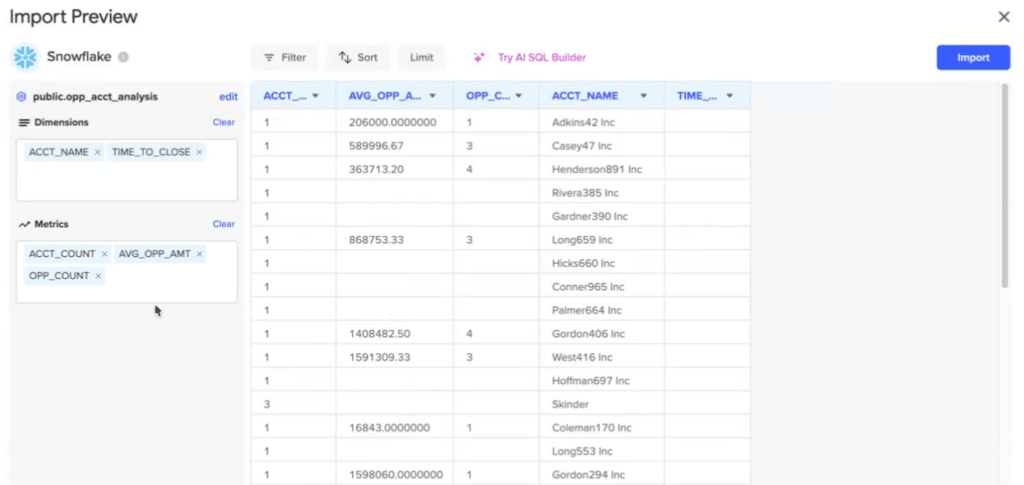
If what you need is the same Snowflake numbers in a spreadsheet every morning, Coefficient pulls Snowflake semantic view metrics on a schedule into Google Sheets or Excel.