



Annual Salary ÷ 12 = Monthly Salary
Stop doing mental math every time you need to convert annual salary figures. This free annual to monthly salary calculator removes the guesswork. You’ll learn how to calculate, interpret, and track salary conversions for budget planning, payroll setup, or job offers.
Here’s what you need to know.
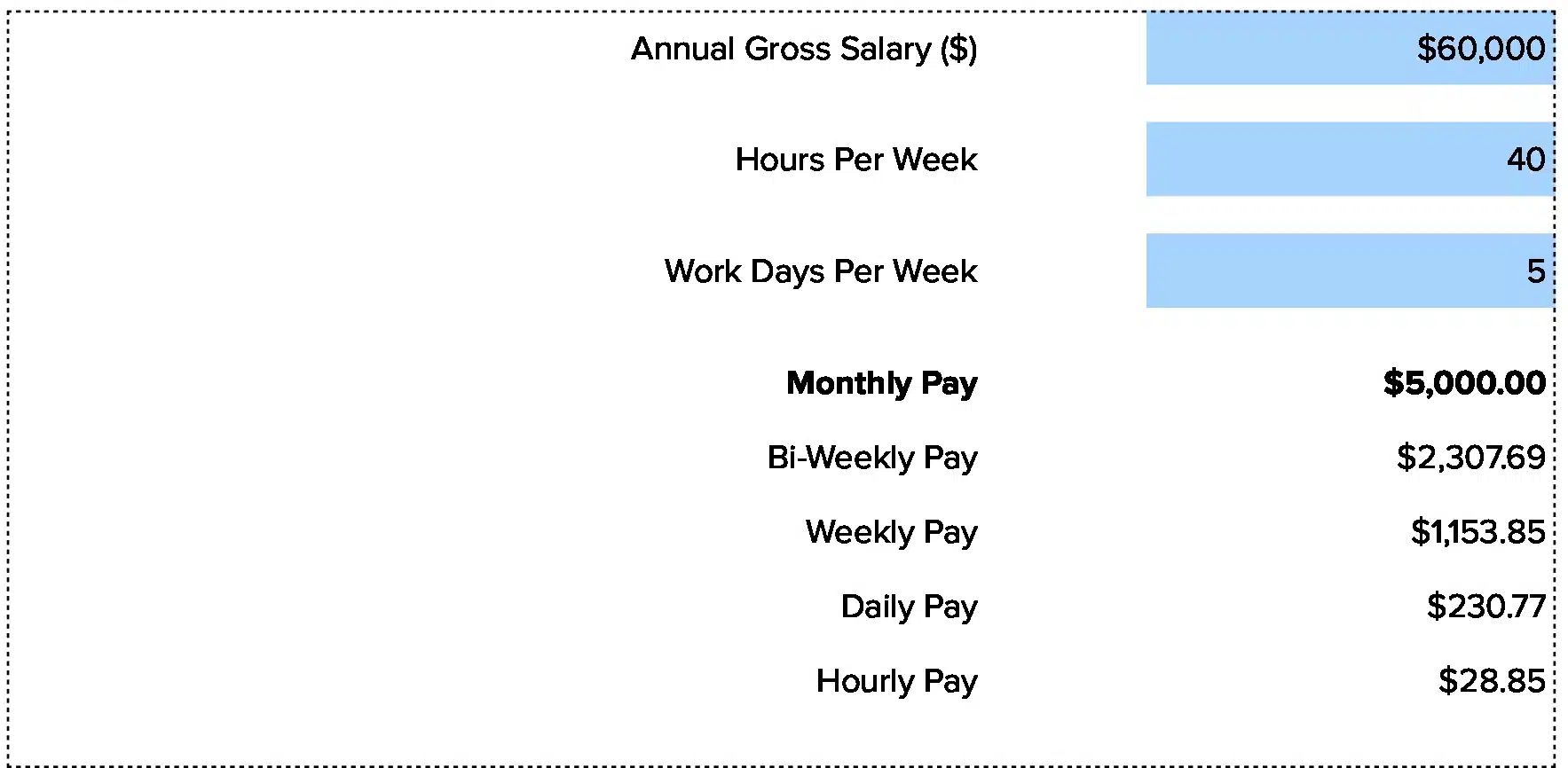
Excel and Google Sheets template you can download and use right away.
Annual to Monthly Salary Formula Explained
Annual Salary ÷ 12 = Monthly Salary
Let’s break this down.
Annual Salary: The total gross pay an employee earns over one full year. This is base pay before deductions for taxes, insurance, or retirement. Most job offers state compensation as an annual figure.
12: The number of months in a calendar year. This constant divides the annual amount into equal monthly parts. Some companies pay bi-weekly (26 pay periods) or semi-monthly (24 pay periods), but monthly calculation uses 12.
Monthly Salary: The gross amount an employee receives each month. This figure helps with monthly budget planning, comparing job offers on a consistent basis, and setting up payroll systems. It’s the pre-tax amount before any withholdings.
Why divide by exactly 12: Because salary is an annual commitment split evenly across the year. Unlike hourly pay that varies by hours worked, salaried employees receive the same amount each month. This predictability makes monthly salary calculations essential for financial planning, both for employers managing labor costs and employees budgeting household expenses. The monthly figure becomes your anchor for rent, bills, and savings goals.
What Is Annual to Monthly Salary?
Annual to monthly salary conversion turns a yearly pay figure into a monthly one. This helps you see what lands in your account each month before taxes.
Finance teams use this calculation daily. HR departments need it for payroll setup. Job seekers want to know their real monthly income. Budget planners rely on it to forecast expenses. The conversion shows the actual cash flow pattern.
Who uses this metric?
CFOs and Controllers building monthly cash flow forecasts and labor cost projections.
Fractional CFOs comparing compensation across multiple client companies quickly.
HR Managers setting up new payroll systems and explaining offers to candidates.
Payroll Specialists calculating monthly gross pay for new hires.
Finance Analysts modeling monthly expense runs and headcount budgets.
How to Calculate Annual to Monthly Salary: Step-by-Step
Let’s walk through a real salary conversion with clear numbers.
- Start with the annual salary figure
Get the total annual compensation amount. This comes from the job offer letter or employment contract. For our example: $84,000
- Identify the conversion factor
Use 12 months as your divisor. This stays constant for all salary conversions regardless of pay schedule.
- Set up the calculation
Write it out: $84,000 ÷ 12
- Perform the division
$84,000 ÷ 12 = $7,000
- Verify the result
Your monthly gross salary is $7,000. This means before any deductions, you’ll receive $7,000 each month.
- Check your math
Multiply back: $7,000 × 12 = $84,000. The numbers match.
- Interpret what this means
At $84,000 annually, you earn $7,000 per month gross. Your net take-home will be lower after taxes and deductions. Use this monthly figure to plan rent, mortgage payments, and monthly bills.
How to Interpret Your Annual to Monthly Salary Number
Your monthly salary determines budgeting approach and financial planning strategies.
| Salary Range (Annual) | Monthly Equivalent | Recommended Actions |
| Below $36,000 | Below $3,000/month | Entry-level compensation – Tight monthly budget requiring careful planning<br>• Track every expense<br>• Build emergency fund slowly<br>• Consider side income sources |
| $36,000 – $60,000 | $3,000 – $5,000/month | Mid-range compensation – Comfortable for basic needs with some flexibility<br>• Create detailed monthly budget<br>• Start retirement savings<br>• Build 3-month emergency fund |
| $60,000 – $100,000 | $5,000 – $8,333/month | Strong compensation – Good room for savings and lifestyle choices<br>• Max out retirement accounts<br>• Invest surplus income<br>• Plan for major purchases |
| $100,000 – $150,000 | $8,333 – $12,500/month | Excellent compensation – Significant discretionary income available<br>• Diversify investments<br>• Consider real estate<br>• Build wealth actively |
| Above $150,000 | Above $12,500/month | Top-tier compensation – High monthly cash flow enables rapid wealth building<br>• Work with financial advisor<br>• Maximize tax-advantaged accounts<br>• Focus on long-term wealth strategy |
Annual to Monthly Salary Benchmarks by Industry
Monthly salary expectations shift based on your industry. Here’s what typical annual-to-monthly conversions look like across sectors.
| Industry | Typical Annual Range | Monthly Equivalent | Notes |
| Technology/Software | $80,000 – $160,000 | $6,667 – $13,333 | Higher in major tech hubs, equity often supplements base |
| Healthcare | $65,000 – $120,000 | $5,417 – $10,000 | Varies widely by role and certification level |
| Finance/Banking | $70,000 – $140,000 | $5,833 – $11,667 | Bonus structures can double monthly take-home |
| Manufacturing | $55,000 – $95,000 | $4,583 – $7,917 | Steady pay with overtime potential |
| Retail Management | $45,000 – $75,000 | $3,750 – $6,250 | Commission can boost monthly income significantly |
| Education | $48,000 – $78,000 | $4,000 – $6,500 | Summer months may require different budgeting |
| Non-Profit | $42,000 – $68,000 | $3,500 – $5,667 | Lower cash pay often balanced by strong benefits |
Benchmark data shows compensation keeps rising. The Bureau of Labor Statistics reports wages increased 3.5% for the 12-month period ending June 2025. This means a $60,000 salary from last year equals roughly $62,100 today.
Different regions also show big gaps. A $75,000 salary in Sacramento equals $6,250 monthly, but that same role might pay $95,000 ($7,917/month) in San Francisco due to cost of living.
Benchmark Citations
Bureau of Labor Statistics Employment Cost Index – June 2025
Foothold America US Salary Benchmarking Guide 2025
Paychex Total Compensation Calculator Guide
Automating Salary Tracking with Coefficient
Stop doing manual salary conversions every time you hire someone. Coefficient connects NetSuite, Sage Intacct, or your HRIS directly to Excel or Google Sheets. Your salary data flows automatically, and monthly amounts calculate themselves with simple formulas.
Set it up once and your comp sheets stay current. Perfect for finance teams managing dozens of employees across different pay scales. Track annual salaries, convert to monthly automatically, and see everything update in real time.
Get started with Coefficient and automate your salary tracking today.
How to Work With Monthly Salary Figures
Once you know your monthly salary, put that number to work.
Build a realistic monthly budget
Start with your gross monthly figure. Subtract taxes (typically 25-30%), insurance, and retirement. What’s left is your actual spending money. Allocate 50% to needs, 30% to wants, 20% to savings.
Compare job offers fairly
Two offers both claim “$75,000 annually.” But one pays $6,250/month, while the other pays $6,170/month with different pay periods. Monthly conversion shows you which actually pays more. Use the monthly figure to match against your monthly expenses.
Set up automatic payments
Your rent or mortgage comes due monthly. Your student loans want monthly payments. Match these to your monthly salary rhythm. Pay bills right after payday when cash is flush.
Plan for irregular months
Some months have three paydays instead of two. Others have extra expenses like insurance premiums or property taxes. Know your base monthly salary to spot these variations.
Track raises accurately
Got a $5,000 raise? That’s $417 more each month. See exactly how much extra cash flow you gained. Use the monthly bump to increase retirement savings or pay down debt faster.
Annual to Monthly Salary vs. Biweekly Pay vs. Hourly Rate
Most people mix these up. They’re all different ways to slice pay.
Annual to Monthly Salary
Take your yearly figure, divide by 12. This shows monthly gross income. Example: $72,000/year = $6,000/month. Used for budgeting and financial planning.
Biweekly Pay
Paid every two weeks means 26 paychecks per year. Take annual salary, divide by 26. Example: $72,000/year = $2,769 biweekly. Two months each year have three paychecks instead of two.
Hourly Rate
Pay per hour worked, multiplied by hours. Annual conversion: (hourly rate × 40 hours × 52 weeks). Example: $35/hour × 2,080 hours = $72,800 annually, or $6,067/month. Overtime changes this significantly.
When to use each
Each method serves different needs. Monthly works best for fixed budgets. Biweekly matches many payroll systems. Hourly applies to non-exempt workers and contractors.
Pro tip for fractional CFOs: When comparing compensation across clients, convert everything to monthly equivalents. A $90,000 annual salary ($7,500/month) becomes directly comparable to a role earning $36/hour ($6,240/month with standard hours). Show clients the real monthly cost of talent.
Plan your finances
The difference between $5,000 and $6,000 monthly is $12,000 annually. That’s a full year of retirement contributions, a vacation fund, or emergency savings.
Know your monthly number. Build your budget around it. Track your actual take-home after deductions.Get started with Coefficient to automate salary conversions and keep your compensation data current across all your spreadsheets.
 Sync Live Finance Data into Your Spreadsheet