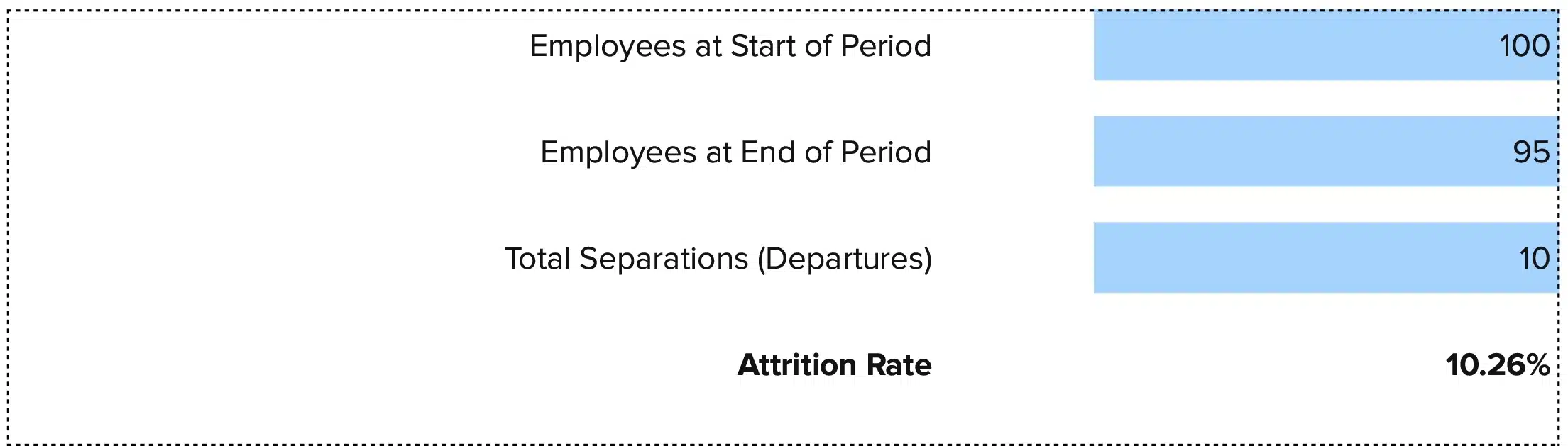




Attrition Rate = (Number of Employees Who Left / Average Number of Employees) × 100
High attrition drains resources and disrupts operations. This free attrition rate calculator cuts through the noise. Whether you need a quick check on workforce stability or want to track patterns month over month, you’ll learn how to calculate, interpret, and manage attrition efficiently.
We’ve also included a free Excel and Google Sheets template you can download and customize for your needs.
Attrition Rate Formula Explained
Attrition Rate = (Number of Employees Who Left / Average Number of Employees) × 100
Let’s break down each part:
Number of Employees Who Left: Count all departures during your measurement period. This includes voluntary resignations, retirements, and position eliminations where roles aren’t backfilled. Don’t count temporary workers, contractors, or employees on leave.
Average Number of Employees: Take your headcount at the start of the period, add your headcount at the end, then divide by two. This gives you a fair baseline that accounts for growth or contraction during the measurement period.
Why multiply by 100: Converting to a percentage makes it easy to compare across departments, time periods, or against industry benchmarks. A result of 0.15 becomes 15%, which is clearer for presentations and decisions.
The key difference between attrition and turnover: attrition specifically tracks departures where positions aren’t immediately filled. Turnover includes all separations, even when you hire replacements.
What Is Attrition Rate?
Attrition rate measures how many employees leave your organization over a set timeframe, typically without immediate replacement. It answers a simple question: “Is our workforce shrinking, and if so, how fast?”
Unlike turnover, which often involves backfilling positions, attrition reflects natural workforce reduction through retirements, voluntary departures, or strategic downsizing. High attrition can signal problems with compensation, culture, or growth opportunities. Low attrition might indicate strong retention—or limited career mobility.
Who uses this metric?
CFOs and Finance Leaders track labor costs and plan workforce budgets across quarters.
HR Directors analyze retention patterns and identify departments with stability issues.
Operations Managers forecast staffing needs and assess team capacity for upcoming projects.
Talent Acquisition Teams plan recruitment pipelines based on expected departures.
Executive Leadership make strategic decisions about organizational structure and headcount targets.
How to Calculate Attrition Rate: Step-by-Step
Let’s walk through a real example using a mid-sized company:
- Define your time period
Choose your measurement window. Monthly, quarterly, and annual calculations each serve different purposes. We’ll use a 12-month period: January 1 to December 31, 2024.
- Count employees at period start
On January 1, 2024, your company had 250 employees on the payroll.
- Count employees at period end
On December 31, 2024, your company had 230 employees on the payroll.
- Calculate average headcount
Add start and end numbers: 250 + 230 = 480
Divide by 2: 480 ÷ 2 = 240 average employees
- Count total departures
During 2024, 32 employees left the company. This includes retirements, resignations, and eliminated positions. Don’t count internal transfers or promotions.
- Apply the formula
Divide departures by average headcount: 32 ÷ 240 = 0.1333
Multiply by 100: 0.1333 × 100 = 13.33%
- Interpret your result
Your annual attrition rate is 13.33%. This means roughly 13 out of every 100 employees left during the year. According to 2025 benchmarks, this falls within the average range for most industries, though context matters based on your sector and business goals.
How to Interpret Your Attrition Rate Number
Context determines whether your attrition rate signals health or trouble. Very low rates might indicate stagnation while very high rates point to systemic problems.
| Attrition Range | Interpretation | Recommended Actions |
| Below 5% | Very low attrition – May indicate limited growth opportunities or aging workforce | • Review promotion pathways<br>• Assess career development programs<br>• Check for succession planning gaps |
| 5% – 10% | Healthy attrition – Normal workforce turnover within acceptable limits | • Maintain current retention practices<br>• Monitor trends by department<br>• Conduct stay interviews quarterly |
| 10% – 15% | Moderate attrition – Manageable but requires attention to prevent increases | • Analyze exit interview data<br>• Review compensation competitiveness<br>• Strengthen manager training programs |
| 15% – 20% | Elevated attrition – Indicates potential systemic issues affecting retention | • Conduct employee engagement surveys<br>• Review benefits packages<br>• Implement targeted retention initiatives<br>• Address department-specific problems |
| Above 20% | High attrition – Critical concern requiring immediate intervention | • Launch comprehensive retention audit<br>• Review leadership effectiveness<br>• Assess company culture issues<br>• Create emergency retention task force |
Attrition Rate Benchmarks by Industry
Industry context matters when evaluating your attrition rate. What’s normal for retail looks very different from government work.
| Industry | Typical Range | Notes |
| Government | 1.4% – 5% | Lowest attrition due to job security, benefits, and pension programs |
| Education | 1.8% – 6% | Stable sector with strong benefits and defined career paths |
| Finance & Insurance | 8% – 12% | Moderate attrition with competitive compensation helping retention |
| Technology | 9% – 14% | Above average despite strong pay due to high competition for talent |
| Healthcare | 12% – 18% | Elevated rates driven by burnout and staffing shortages |
| Professional Services | 13% – 17% | Higher attrition in consulting and advisory roles |
| Manufacturing | 13% – 19% | Varies by location and skill requirements |
| Retail & Wholesale | 20% – 27% | Highest attrition due to seasonal work and lower compensation |
Benchmark Citations
AIHR Turnover vs Attrition Analysis
BambooHR 2025 Turnover Benchmarking Report
Mercer 2025 US Turnover Survey
Automating Attrition Rate Tracking with Coefficient
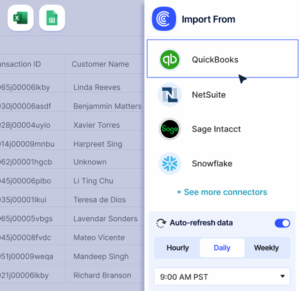
Stop wrestling with monthly CSV exports from your HRIS system. Coefficient connects BambooHR, Workday, ADP, or your HR platform directly to Excel or Google Sheets. Your headcount data flows automatically, and your attrition calculations update themselves.
Set it up once. Your finance team gets real-time attrition metrics without the manual work. Perfect for CFOs tracking workforce costs across multiple entities or HR teams building executive dashboards.
Get started with Coefficient to automate your attrition tracking.
How to Improve Your Attrition Rate
High attrition isn’t permanent. Here are five proven strategies:
Fix compensation gaps fast
Compare your pay ranges to market data quarterly. Losing employees to 15% pay bumps elsewhere is expensive. The cost to replace someone typically runs 50% to 200% of their salary. Review and adjust pay bands before people start looking.
Create clear advancement paths
Employees who see no future leave to find one. Map out realistic promotion timelines for each role. Share these paths during onboarding and annual reviews. Internal promotions cost less than external hires and boost morale across teams.
Train your managers better
People don’t leave companies. They leave bad managers. Invest in leadership development. Teach managers to give regular feedback, recognize good work, and handle conflicts early. One toxic manager can drive attrition across an entire department.
Offer flexible work options
Remote and hybrid work aren’t perks anymore. They’re expectations. Companies forcing rigid office schedules lose talent to competitors offering flexibility. Define your work model clearly and stick to it consistently.
Conduct meaningful exit interviews
Don’t wait until someone’s gone to ask why. Run stay interviews quarterly. When people do leave, dig into their real reasons. Look for patterns across multiple exits. One person leaving for better pay is normal. Five people from the same team leaving for the same reason is a problem you can fix.
Attrition Rate vs. Turnover Rate vs. Retention Rate
These three metrics measure different aspects of workforce stability:
Attrition Rate
Tracks employees who leave without replacement. It measures workforce reduction over time. Use this when planning long-term headcount and budget.
Turnover Rate
Includes all departures, whether positions get filled or not. It captures the full cost of employee churn. Use this to calculate recruiting and training expenses.
Retention Rate
Measures the flip side: what percentage of employees stay. Calculate it as: (Employees at Period End ÷ Employees at Period Start) × 100. Use this to track the success of retention programs.
When to use each
Track all three metrics together. High turnover with low attrition means you’re replacing people fast but maintaining headcount. High attrition with low turnover signals intentional downsizing or poor backfilling processes. Each tells part of the story.
Pro tip for fractional CFOs: Track all three metrics together for clients. High turnover with low attrition means they’re replacing people fast but maintaining headcount. High attrition with low turnover signals intentional downsizing or poor backfilling processes. Each tells part of the story.
Measure What Matters
Attrition rates between 5% and 15% signal healthy workforce dynamics for most industries. Below 5% might indicate stagnation. Above 20% demands immediate action.
Compare your rate against industry benchmarks, then dig deeper into department-level data. The aggregate number hides problems when one team shows 30% attrition while others stay at 8%.
Get started with Coefficient to automate your workforce metrics and spot trends before they become problems.
 Sync Live Finance Data into Your Spreadsheet