


Table of Contents

- 1. 8 Ways to Improve Query Optimization in Snowflake (With Examples)
- 2. How to Prevent Data Silos Using Snowflake Semantic Views
- 3. Snowflake Semantic Views vs Semantic Model: Key Differences Explained
- 4. What Is Snowsight? A Complete Guide to Snowflake’s Web Interface
- 5. How Snowflake Customers Can Unlock More Value through Last-Mile Activation
- 6. From Snowflake Intelligence to the Spreadsheet: A Builder’s Guide to Last-Mile Data Activation
- 7. How to Ingest Data into Snowflake: Methods, Tools, and Best Practices
- 8. How to Query JSON Data in Snowflake
- 9. How to Copy Data from One Table to Another Table in Snowflake
- 10. How to Load Unstructured Data in Snowflake: Files, Documents, and AI Pipelines
- 11. How to Flatten JSON Data in Snowflake
- 12. How to Load Data into Snowflake
- 13. How to Parse JSON Data in Snowflake?


Snowsight is the web-based user interface for Snowflake. It’s what you see when you log into your Snowflake account at app.snowflake.com: the home screen, the SQL editor, the navigation, the charts, the admin pages. If you’ve used Snowflake in the last few years, you’ve used Snowsight.
It replaced the older Classic Console in 2021 and became the only supported web UI in 2023. Today, Snowsight is where data engineers write queries, admins manage roles and credits, and (until June 22, 2026) business users built simple dashboards.
This guide covers what Snowsight is, what it does, what’s changing in 2026, and how different roles on a team should use it.
A quick history
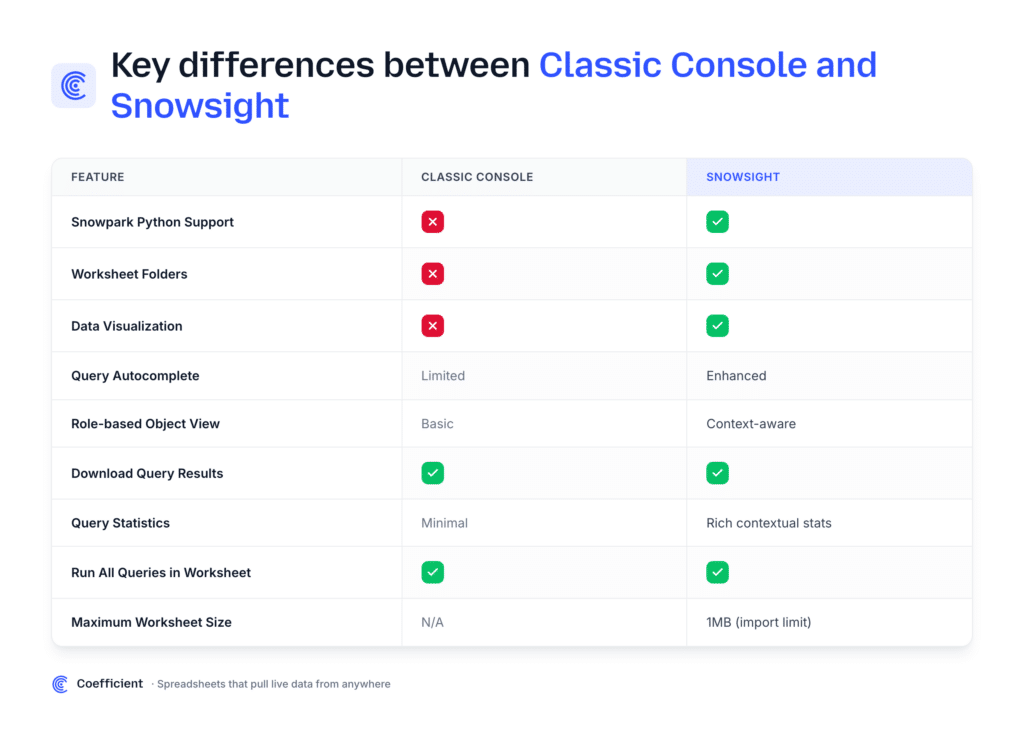
Snowsight launched in 2019 as a redesigned alternative to Snowflake’s original Classic Console. The Classic Console was a stripped-down query interface: useful, but limited to running SQL and viewing results. Snowsight added charting, dashboards, schema browsing, query history visualization, and account administration in one interface.
In 2023, Snowflake deprecated the Classic Console and made Snowsight the only supported web UI. Since then, Snowsight has been the default starting point for everyone who uses Snowflake from a browser.
In 2026, Snowsight itself is being modernized again. Workspaces is replacing Worksheets, and Legacy Dashboards is being removed entirely. More on that below.
What you can do in Snowsight
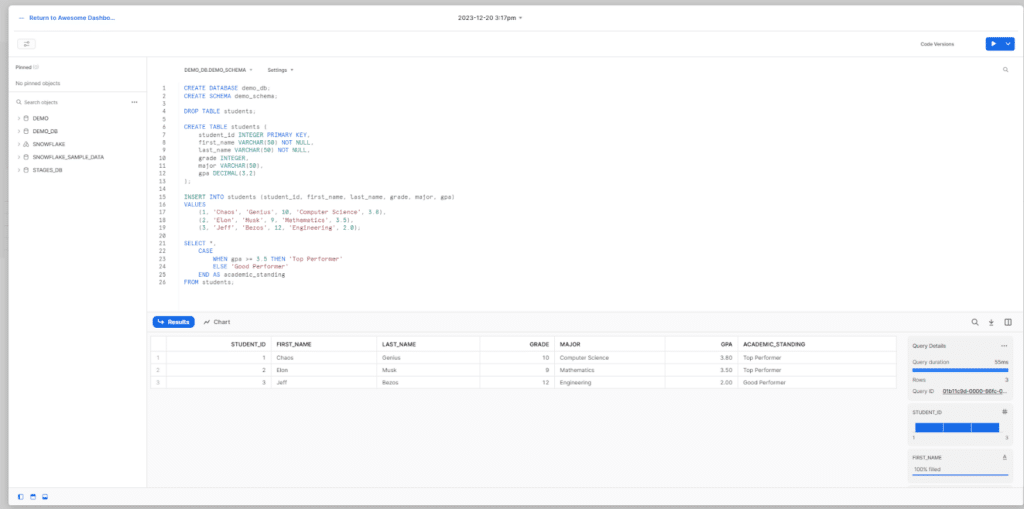
Run SQL queries (Worksheets and Workspaces)
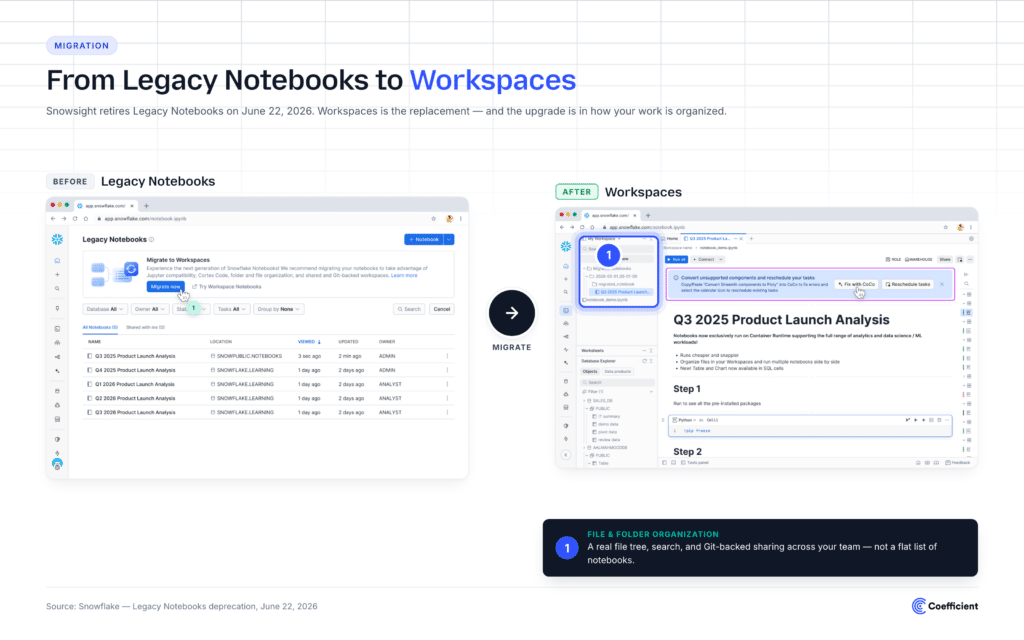
The core of Snowsight is the SQL editor. Until April 20, 2026, that editor was called Worksheets, a tab-based interface where each worksheet held one SQL session. As of April 20, the editor became Workspaces, with file-and-folder organization, Git integration, and shared editing.
Workspaces is the future. Legacy Worksheets is being removed on June 22, 2026.
Browse and explore your data
The Catalog (sometimes called the Database Explorer) lets you browse databases, schemas, tables, and views. You can preview data, inspect column types, see usage stats, and run quick queries against any object you have access to.
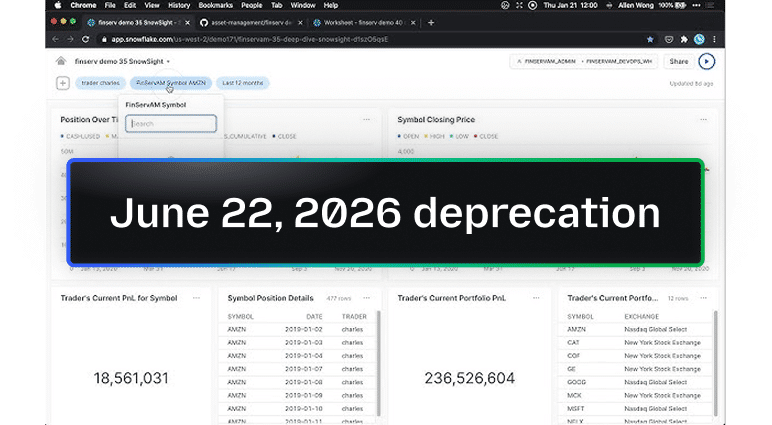
Build dashboards (until June 22, 2026)
Legacy Dashboards let you assemble SQL queries into charts and arrange them into a board. Refresh schedules ran in the background. The dashboard was shareable to anyone with a Snowflake login.
On April 20, 2026, new dashboard creation was disabled. On June 22, 2026, the Legacy Dashboards UI is fully removed. Snowflake’s recommended replacements are Streamlit apps (Python) or third-party BI tools. Full migration guide here.
Develop data apps (Streamlit in Snowflake)
Streamlit in Snowflake is Snowflake’s framework for building Python-based data apps inside the platform. After June 22, 2026, it becomes the official native replacement for Legacy Dashboards. Streamlit apps are full Python applications: powerful for engineering teams, structurally mismatched for non-developers.
Manage cost, usage, and admin
Snowsight includes account administration: user and role management, cost dashboards (separate from the deprecated Legacy Dashboards), warehouse configuration, replication monitoring, and security settings.
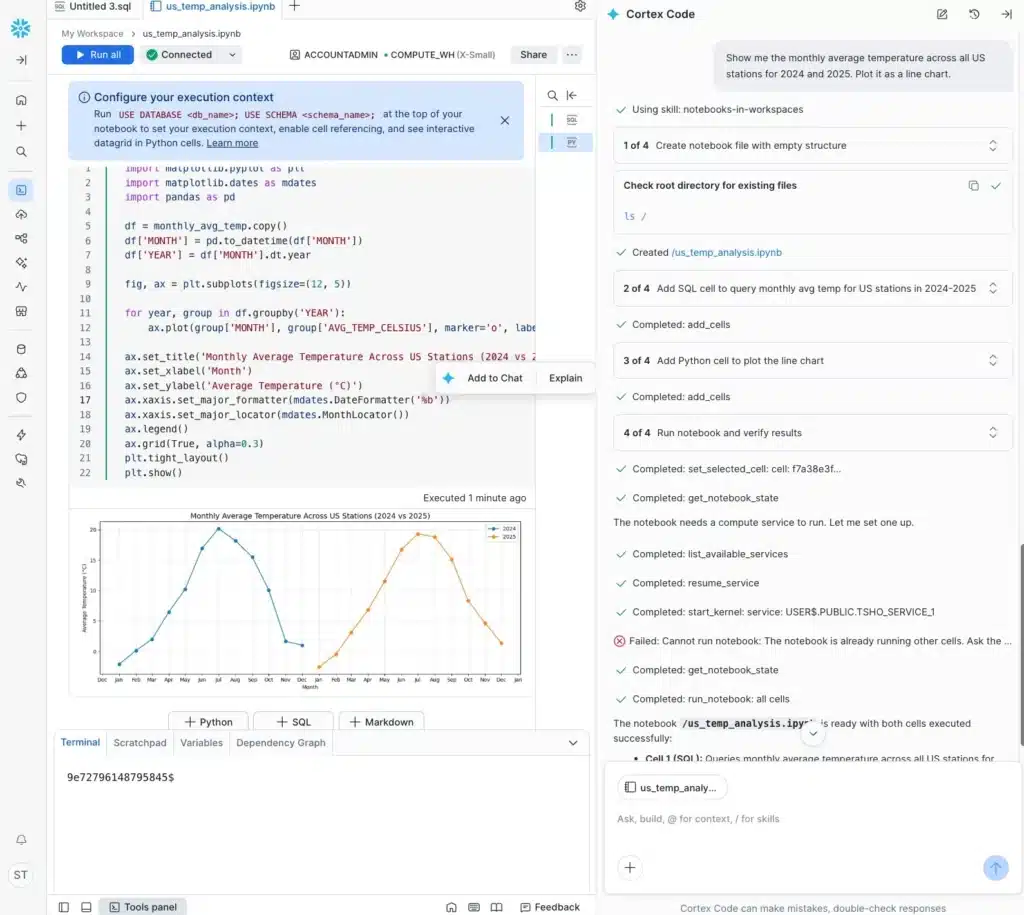
Cortex Code (AI assistance)
Cortex Code in Snowsight is Snowflake’s AI assistant for SQL development. It generates queries from natural language, explains existing SQL, and suggests optimizations. It’s embedded into Workspaces.
Load data
Snowsight has a built-in data loading interface for getting CSV, Parquet, JSON, and other files into Snowflake without leaving the browser. Useful for small ad-hoc loads. For production data pipelines, teams typically use Snowpipe, an ETL tool, or a spreadsheet-native live connector instead.
What’s changing in 2026
The full Snowflake BCR notice covers two parallel deprecations.
Legacy Worksheets
- What’s happening: Replaced by Workspaces. URLs remain as a migration bridge.
- Effective dates: Mandatory April 20, 2026. UI removed June 22, 2026.
Legacy Dashboards
- What’s happening: New creation disabled, then fully removed.
- Effective dates: No new creation as of April 20, 2026. UI removed June 22, 2026.
For Workspaces, the migration is straightforward. Workspaces does what Worksheets did, with more.
For Dashboards, there’s no like-for-like replacement. Snowflake recommends Streamlit (Python) or a third-party BI tool. For teams whose dashboards were built by non-developers, that’s a real decision to make. Migration guide here.
Snowsight for different roles
Data engineers
Snowsight is the daily home: Workspaces for queries, query history for debugging, Catalog for schema work, Cortex Code for assistance. After June 2026, Streamlit replaces the limited charting that was in Dashboards.
Data analysts
Workspaces handles SQL. For visualization and reporting after June 22, Snowsight no longer has a native dashboard tool. Most analysts will need to pair Snowsight with a BI tool (Tableau, Power BI, Looker, Sigma) or a spreadsheet-native publishing tool like Coefficient.
Business users (Finance, RevOps, GTM, Ops)
The audience that loses the most in the deprecation. Legacy Dashboards was the rare Snowflake feature accessible without SQL fluency. With it gone, the practical options are:
- Ask the data team for a Streamlit app.
- Wait for a BI tool license and someone to build the dashboard in it.
- Pull the Snowflake data into a spreadsheet and publish from there.
The third option is what Coefficient does. Walkthrough here.
Account admins
Snowsight remains the admin home for users, roles, warehouses, billing, replication, and security. The 2026 deprecations don’t affect this part of the product.
How Snowsight compares to other warehouse UIs
SQL editor
- Snowsight (Snowflake): Yes (Workspaces)
- BigQuery Console (GCP): Yes
- Redshift Query Editor (AWS): Yes
Native dashboards
- Snowsight: Removed June 22, 2026
- BigQuery Console: Limited (saved queries plus Data Studio handoff)
- Redshift Query Editor: No (handoff to QuickSight)
AI assistance
- Snowsight: Cortex Code
- BigQuery Console: Gemini in BigQuery
- Redshift Query Editor: Q in QuickSight
Native app framework
- Snowsight: Streamlit
- BigQuery Console: No (uses Looker Studio)
- Redshift Query Editor: No (uses QuickSight)
Snowsight is the most feature-complete warehouse-native UI of the three. The 2026 deprecations narrow that gap.
Frequently asked questions
What is Snowsight in Snowflake? The official web-based user interface for Snowflake. It replaced the older Classic Console in 2021 and is the only supported web UI today.
How do I access Snowsight? Log in at app.snowflake.com with your Snowflake account credentials. Some organizations use a custom URL pattern like <account>.snowflakecomputing.com.
What’s the difference between Snowsight and SnowSQL? Snowsight is the browser-based UI. SnowSQL is the command-line client. Both connect to the same Snowflake instance and run the same SQL.
Is Snowsight free? Snowsight itself is included with every Snowflake account. The cost is the Snowflake compute and storage you use through it.
What’s replacing Snowsight Worksheets? Workspaces, Snowflake’s new SQL editor. It became mandatory on April 20, 2026, and fully replaces Legacy Worksheets on June 22, 2026.
What’s replacing Snowsight Dashboards? Nothing native. Snowflake recommends Streamlit apps for engineering-owned dashboards and third-party BI tools (or spreadsheet-native tools like Coefficient) for everyone else. Full migration guide here.
Can I still use Legacy Worksheets after April 20, 2026? Account admins can temporarily revert via the USE_WORKSPACES_FOR_SQL parameter until June 22, 2026, when the legacy UI is removed entirely.
What is Cortex Code in Snowsight? Snowflake’s built-in AI assistant for SQL. It generates queries from natural language, explains existing SQL, and suggests optimizations. It’s embedded into Workspaces.
What is Streamlit in Snowsight? A framework for building Python-based data apps that run inside Snowflake. After June 22, 2026, it’s Snowflake’s official replacement for the Legacy Dashboards feature.
Does Snowsight have a dark mode? Yes. Toggle it from the user menu in the top-right corner of the Snowsight interface.
Which chart types does Snowsight support? Bar, line, area, scatter, heatmap, and pie charts in the legacy charting interface. Workspaces and Streamlit support a broader set through Python visualization libraries.
When to use Snowsight, and when to reach for something else
Snowsight is the right tool for:
- Writing and running SQL against Snowflake (Workspaces)
- Browsing schema and exploring data (Catalog)
- Administering accounts, users, roles, warehouses, and cost (Admin pages)
- Building Python-based data apps (Streamlit) if you have engineering capacity
Reach for something else when:
- You need a dashboard a non-developer can build and maintain (spreadsheet-native tools, BI platforms)
- You need scheduled data delivery into Sheets, Excel, or Slack (Coefficient, Sigma, Fivetran for warehouse-side ETL)
- You need rich visualization for stakeholder reporting (Tableau, Power BI, Looker)
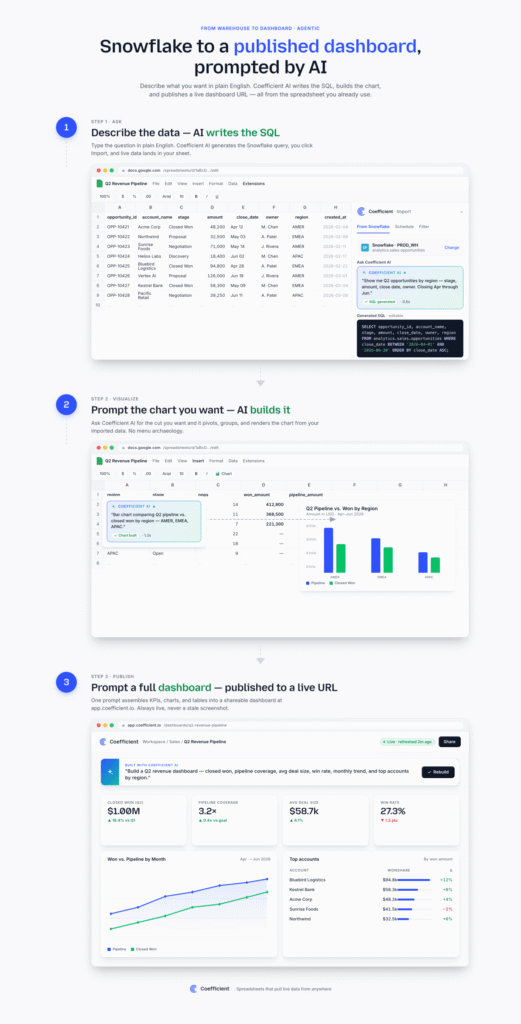
Get the most out of Snowflake without writing SQL
Coefficient connects Snowflake to Google Sheets and Excel. Pull live data with a few clicks (no SQL required), build models in the spreadsheet, and publish live web dashboards. It’s the spreadsheet-native bridge for everyone who used Snowsight Dashboards and needs a path forward after June 22.
Install Coefficient free. Google Sheets, Excel, no credit card.
