


Table of Contents

-
1. NetSuite MCP Connector: Capabilities, Limits and the Reporting Gap
- What the NetSuite MCP connector actually is
- NetSuite MCP vs SuiteAgents vs NetSuite AI
- What the MCP Standard Tools SuiteApp gives you
- How to set up NetSuite MCP
- Benefits of using NetSuite MCP Connector
- Limitations of NetSuite MCP
- When should you use Netsuite MCP and when you should not
- Overcoming NetSuite MCP Limitations using Coefficient AI
- How Cyrq Energy used Coefficient to overcome a similar problem
- NetSuite MCP and Coefficient AI side by side
- How to decide between Netsuite MCP usage vs Alternatives like Coefficient AI


The NetSuite MCP launch has reactions split into two camps. One says the ERP reporting bottleneck is finally over. The other says nothing has actually changed. Both miss the same thing. MCP is not one capability. It is a tool that is very good at one job and badly shaped for another, and most of the confusion comes from people testing it on the wrong job.
| Quick answer NetSuite MCP is Oracle’s implementation of the Model Context Protocol, officially named the NetSuite AI Connector Service. It lets AI clients such as Claude and ChatGPT query records, run reports and saved searches, execute read-only SuiteQL and create or update records using natural language, governed by your existing NetSuite role. It answers ad-hoc questions well. It does not produce recurring, refreshable reports. |
What the NetSuite MCP connector actually is
It is a protocol-driven integration layer. Your AI client authenticates over OAuth 2.0, discovers the tools NetSuite exposes, then invokes them on your behalf. Access is governed by the NetSuite role you connect with, so the client sees what that role sees and nothing more.
The design goal is avoiding lock-in. Oracle built it as protocol first rather than embedding a fixed chatbot, so you bring your own assistant.
One thing trips people up. MCP is a protocol, not intelligence. It defines how the AI client and NetSuite talk to each other. It makes no promise at all about whether the answer coming back is right.
NetSuite MCP vs SuiteAgents vs NetSuite AI
These three get conflated constantly, and they point in different directions.
| Name | What it is | Direction |
|---|---|---|
| NetSuite AI Connector Service (MCP) | Oracle’s MCP server. External AI clients read and write NetSuite data under your role’s permissions | Outside AI reaching into NetSuite |
| SuiteAgents | Agents that run inside NetSuite and act on NetSuite workflows without an external client | NetSuite acting on itself |
| NetSuite AI features | Capabilities Oracle embedded directly in the product, such as Text Enhance and Bill Capture | Built in, nothing to connect |
If you want Claude or ChatGPT to see your ERP data, you want the AI Connector Service. If you want automation running inside NetSuite with no external client involved, you want SuiteAgents.
What the MCP Standard Tools SuiteApp gives you
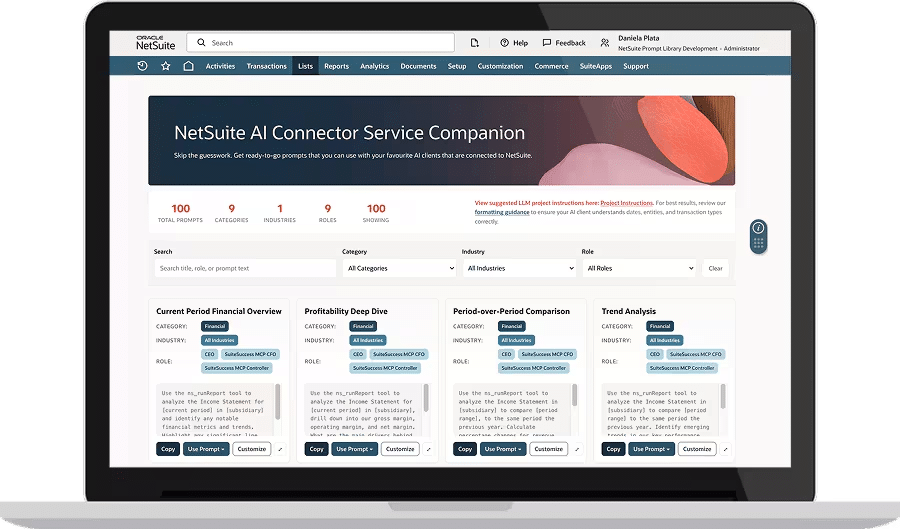
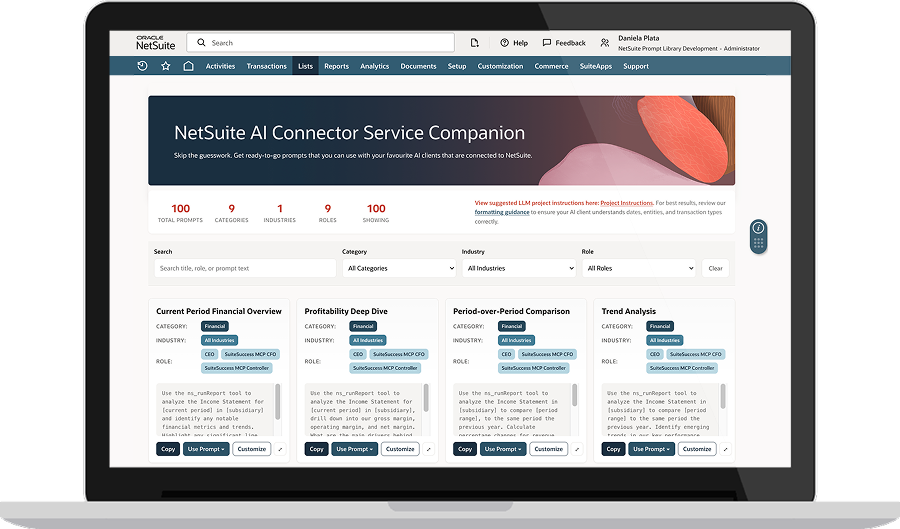
The AI connector service is not useful without the MCP Standard Tools SuiteApp, which you install from the SuiteApp Marketplace. It ships four tool groups.
- Record tools cover ns_getRecord, ns_createRecord, ns_updateRecord and ns_getRecordTypeMetadata. These read and write through REST Web Services, so the role needs REST Web Services at Full.
- Report tools cover ns_listAllReports and ns_runReport, plus helpers that return your accounting books, accounting contexts, nexuses and subsidiaries so report results can be filtered correctly.
- Saved search tools cover ns_listSavedSearches and ns_runSavedSearch. These need Perform Search at View.
- SuiteQL tools cover ns_runCustomSuiteQL and ns_getSuiteQLMetadata. SuiteQL through MCP is read-only, so the model can query as freely as its role allows but cannot write through this path.
You can also build custom tools in SuiteScript when the standard set does not cover a workflow. That is a developer project rather than a configuration change.
How to set up NetSuite MCP
It requires four stages inside NetSuite and one in your AI client.
- Step 1: Enable the features. Setup > Company > Enable Features, SuiteCloud subtab. Turn on Server SuiteScript, REST Web Services and OAuth 2.0. Missing REST Web Services is the most common cause of tools that appear to connect and then return errors.
- Step 2: Install the SuiteApp. Find MCP Standard Tools in the SuiteApp Marketplace and install it. Tool definitions register with the AI Connector Service automatically. Confirm under Customization > SuiteCloud Development > Installed SuiteApps.
- Step 3: Create a dedicated MCP role. Administrator does not work here and Oracle blocks it deliberately. Build a custom role with MCP Server Connection and OAuth 2.0 Access Tokens at Full, add REST Web Services at Full if you want record actions, then layer record-level permissions for what the AI should actually see.
- Step 4: Enable the integration record. NetSuite creates one on first connection. Go to Setup > Integration > Manage Integrations, find the record named for your client and set State to Enabled.
Least privilege matters more than usual on that third step. An auditor will ask you to show separation between human access and machine access, and a purpose-built MCP role is far easier to defend than an admin token pointed at an AI provider.
How to setup MCP for NetSuite and Claude
In Claude, open Settings, then Connectors, then Browse connectors, and select the NetSuite AI connector. If it is not listed, add it as a custom remote MCP server using your account endpoint. At the NetSuite login prompt, switch to your custom MCP role rather than Administrator, then complete OAuth consent.
Oracle requires the Pro plan or higher for Claude. Claude Code users can authenticate from the CLI instead. Once connected, the client asks permission before each tool call. Leave that on while you are still learning what the model does with write access.
How to setup MCP for NetSuite and ChatGPT
ChatGPT Business and Enterprise support the MCP Standard Tools SuiteApp through workspace connectors. A workspace admin enables developer mode under Workspace Settings, then Permissions and Roles, then Connected Data, and adds the NetSuite endpoint before publishing it to the workspace.
Oracle requires the Plus plan or higher for ChatGPT. Callback URLs are dynamic, so every connection creates its own NetSuite integration record. Worth knowing before ten people connect and your integrations list turns into a mess.
Benefits of using NetSuite MCP Connector
It would be easy to write this section grudgingly. We are not going to, because the tool is real and it removes a real bottleneck.
- Ad-hoc questions. “What did we spend with this vendor last quarter” gets answered in seconds instead of becoming a saved search request.
- Exploring an unfamiliar instance. The metadata tools make a strange chart of accounts navigable fast.
- Drafting queries. Have the model write SuiteQL that you then review and save properly.
- One-off record work. Creating a single customer record or correcting a field beats clicking through forms.
- Shrinking the admin queue. Most requests that reach a NetSuite admin are questions rather than projects, and MCP absorbs a good share of them.
If your problem is that you have become the human API between NetSuite and Slack, MCP helps you the day you turn it on.
Limitations of NetSuite MCP
Everything below comes from Oracle’s own documentation rather than our reading of it.
- Generated SQL and financial reports do not mix
Oracle’s best practices page is blunt about this. DO NOT use SuiteQL or build new reports for financial reports, because NetSuite standard reports apply business rules that SuiteQL cannot (This can be overcome by using Coefficient’s Netsuite agent which pulls the exact reports and statements from the Netsuite URL).
Your standard Income Statement is not a query. It carries eliminations, consolidation logic, accounting book and context handling, and period rules. A SuiteQL statement that sums the same GL accounts returns a number that is technically valid and financially wrong.
The model does not know it made that mistake. Neither does the person who receives the answer.
- Oracle asks you to check the output
Oracle also says that it may not fully prevent inaccuracies or hallucinations from language models and tells users to review both the tool calls and the final answer because models sometimes make information up.
There is also guidance to tell the model to use real data from your NetSuite account so you do not get sample data in the results. Which strongly implies sample data has turned up in results.
- Every viewer needs a seat and every view costs tokens
Oracle requires Claude Pro or higher, or ChatGPT Plus or higher, to add the connector at all.
So the weekly AR summary your eight-person leadership team reads means eight AI subscriptions and eight separate conversations. Each copy is generated fresh, which means the model re-decides how to fetch the number every single time. Two of them will disagree on a Tuesday and nobody will be able to explain why.
That is not really a pricing complaint. It’s a consistency problem wearing a pricing costume.
- The answer lives in a chat thread
An MCP answer has no URL, no refresh schedule and no shared version. It exists inside one person’s conversation until that person scrolls past it.
For a question, that is completely fine. For the reporting pack you rebuild every month, it means re-asking the same question forever and hoping for the same answer.
When should you use Netsuite MCP and when you should not
To put it simply,
An ad-hoc question, asked once, by one person: MCP is the better tool and you should use it.
A recurring report, same numbers, several readers, on a schedule: it is the wrong tool and no amount of prompt engineering fixes the problem.
MCP puts the AI model on the data. It decides how to fetch, it reads the rows and it reports the number. Ask twice, get two derivations.
The alternative is putting the AI model in the build path using simple automation using Coefficient. AI helps you assemble the report once. After that the numbers arrive through a deterministic scheduled pull from NetSuite, with no model sitting between the ERP and the cell.
Overcoming NetSuite MCP Limitations using Coefficient AI
Coefficient connects NetSuite to Google Sheets and Excel with scheduled refresh, writeback and a dashboard layer on top. Four pieces map to the four limitations of the Netsuite MCP.
- Pull the exact report NetSuite renders
The Coefficient NetSuite Agent takes a URL. Open the standard or custom report, saved search or dataset you already trust, copy the address, paste it in, and the rendered view lands in your sheet.
That sidesteps the business-rules problem completely. You are not asking anything to reconstruct your Income Statement. You are importing the Income Statement.
Filters carry across, so you can adjust class, department or time period, and switch column grouping from a single total to accounting periods, before the import runs.
- Trace every number back to its source
A dashboard built on those imports carries an Explain control. Click any figure and it shows the source columns it came from and how it was calculated.
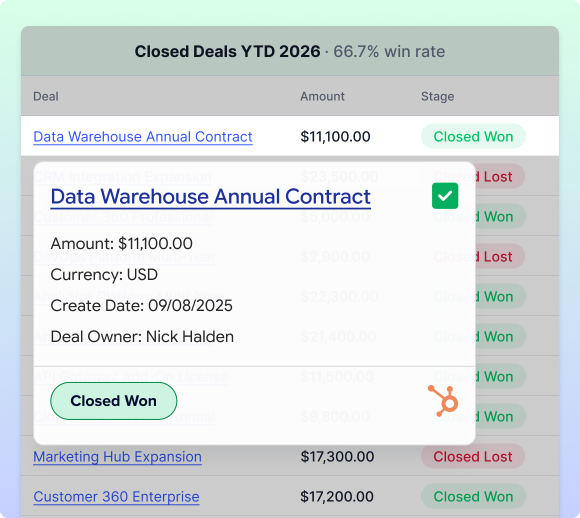
Charts drill down. A revenue by type chart opens into monthly revenue, then top items, then transaction-level detail. An AR chart opens into individual invoices with their ageing, which is usually the moment someone spots the invoice nobody chased.
That is the direct answer to the review-the-output problem. Verification stops being a manual re-derivation and becomes a click.
- Schedule it and share one URL
The connector runs server-side on an hourly, daily or weekly schedule. No session, no conversation, no tokens per refresh. It covers Records and Lists, Saved Searches, Reports, Datasets and SuiteQL, alongside 150+ other systems if your reporting spans more than the ERP.
The dashboard publishes a link and viewers need no AI subscription to open it. Here’s an example dashboard.
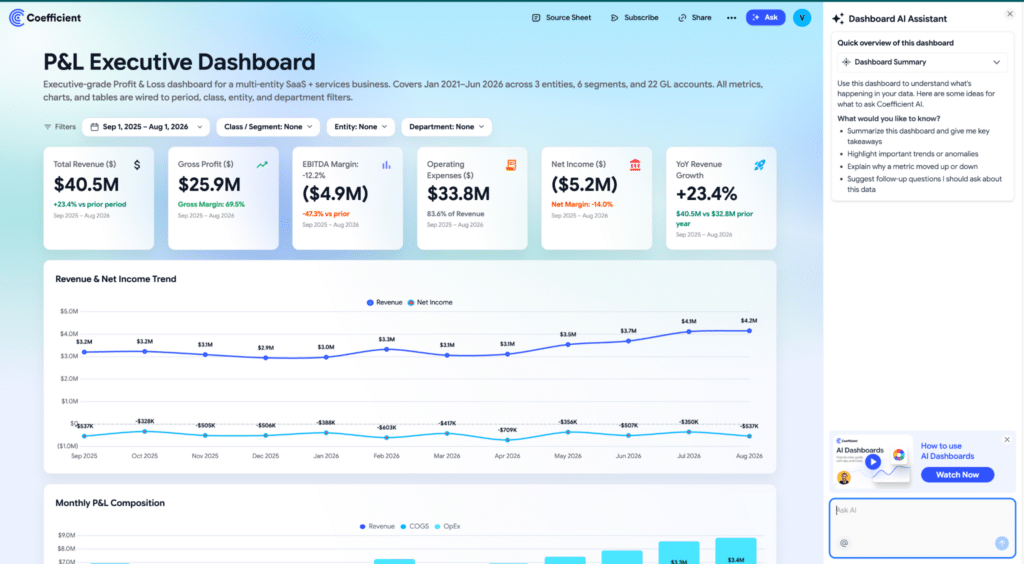
Personalized views handle scoping. Add a permissions tab to the source sheet mapping each email to a filter value, and one dashboard serves a whole finance or sales org, with each person seeing only their rows.
- Write back in bulk with a trail
MCP can create and update records, so this is not a can versus cannot comparison. It is a comparison of shape.
Coefficient’s export maps a whole sheet at once. For a journal entry that means external ID, subsidiary and line-level accounts, debits and credits, with the balance visible before you post and a preview of every change.
How Cyrq Energy used Coefficient to overcome a similar problem
Cyrq Energy runs geothermal plants across the western United States with a corporate team of under twenty people, reporting into an infrastructure sponsor that expects a lot of paper.
Sam Sholeff, their Director of Finance, rebuilt the entire NetSuite to Excel pipeline in days after earlier attempts with other query tools took months. The reason it worked is the same principle as the business-rules point above. Roughly 80% of the data cleaning happens inside NetSuite, before anything reaches the spreadsheet.
The result was more than $50,000 a year in avoided software cost and several hours back every week.
NetSuite MCP and Coefficient AI side by side
| NetSuite MCP | Coefficient | |
|---|---|---|
| Best fit | Ad-hoc questions and one-off record work | Recurring reports and shared dashboards |
| Financial rule fidelity | Standard reports are accurate. SuiteQL bypasses business rules and Oracle advises against it for financials | Imports the rendered NetSuite report, saved search or dataset with business rules intact |
| Number traceability | Review the tool calls and the output manually | Click any figure for source columns, drill to transaction level |
| Refresh | Re-ask the question | Hourly, daily or weekly, server side, no session needed |
| Cost per extra viewer | One AI subscription per person | No AI subscription needed to view a dashboard |
| Row-level access | A NetSuite role per access pattern | Permissions tab maps email to filter value on one dashboard |
| Write-back | Conversational, a record at a time | Bulk sheet export with mapping, preview and IDs returned |
| Setup effort | SuiteApp install plus a custom role | Admin RESTlet configuration plus periodic re-auth |
| Output | Text inside a chat thread | Spreadsheet model plus a shareable dashboard URL |
How to decide between Netsuite MCP usage vs Alternatives like Coefficient AI
Three questions settle most of it.
Are you asking this once or every month? Once is a question. Every month is a pipeline.
Is one person reading the answer, or several? One person is a conversation. Several people need a single version they can all open.
Does the number go to a board, a lender or an auditor? If it does, it needs a traceable path back to a NetSuite report rather than a derivation you have to take on trust.
Most finance teams end up running both. MCP for the questions nobody planned for, a connector for the reports everybody expects. You can connect NetSuite to Google Sheets or Excel and build your first dashboard on the free plan.