
Table of Contents



Salesforce is the CRM. But it doesn’t do everything and was never meant to. The revenue teams getting the most out of it are the ones who’ve connected it to the tools their people actually work in every day: their spreadsheets, their communication platforms, their sales engagement tools, and their data enrichment sources.
This guide covers the best Salesforce integrations by category and the best Salesforce connectors for moving data between Salesforce and the rest of your stack, whether that’s a spreadsheet, a data warehouse, or a workflow automation platform.
One note before diving in: In September 2025, Salesforce updated its security model to require all third-party connected apps to be explicitly installed by a Salesforce admin before users can create new connections. This applies to every tool on this list. If you’re setting up a new integration, loop in your Salesforce admin early.
Best Salesforce Integrations at a glance
| Category | Tool | Best For | Starting Price |
|---|---|---|---|
| Data and reporting | Coefficient | RevOps and finance teams in Google Sheets or Excel | Free tier available |
| Sales engagement | Outreach | Sequenced outreach at scale | ~$100/user/month |
| Conversation intelligence | Gong | Call coaching and deal intelligence | Custom pricing |
| Data enrichment | ZoomInfo | Keeping CRM records accurate | Custom pricing |
| Marketing automation | Pardot | B2B lead nurturing tied to Salesforce pipeline | From $1,500/month |
| Collaboration | Slack | Real-time Salesforce alerts where teams work | From $15/user/month |
| E-signatures | DocuSign | Removing contract friction from the sales cycle | From $10/month |
Best Salesforce Connectors at a glance
| Type | Tool | Best For | Starting Price |
|---|---|---|---|
| Spreadsheet | Coefficient | Live Salesforce sync into Google Sheets or Excel with multi-source blending | Free tier available. Paid plans from $49/month |
| Spreadsheet | Salesforce Data Connector | Basic Salesforce-only imports into Google Sheets | Free |
| Spreadsheet | XL-Connector | Excel-native Salesforce data management | From $20/user/month |
| Workflow automation | Zapier | Simple no-code Salesforce automation | Free (limited) |
| Workflow automation | Workato | Complex multi-system workflow automation | Custom pricing |
| Workflow automation | MuleSoft | Enterprise-scale API integration | From ~$250K/year |
| Data warehouse – BI / ETL | Devart ODBC Driver | Developers and analysts connecting Salesforce to ODBC-compliant BI, reporting, or ETL tools | From $179 (Desktop edition) |
| Data warehouse | Fivetran | Salesforce-to-warehouse ETL pipelines | Custom pricing |
Best Salesforce integrations for Revenue Teams
1. Coefficient for Data Syncs & Flexible Reporting
Best for: RevOps, sales ops, and finance teams that live in Google Sheets or Excel

Native Salesforce reports cap at 2,000 rows, can’t be shared with anyone who doesn’t have a Salesforce license, and can’t be combined with data from other systems without manual exports. Teams work around this by pulling CSVs and pasting them into spreadsheets, which becomes a maintenance problem the moment anything changes in the underlying data.
Coefficient fixes this at the root. It connects Google Sheets or Excel directly to your Salesforce org, syncs live data on a schedule you set, and lets you write changes back to Salesforce without leaving your spreadsheet. It also connects to 150+ other sources including HubSpot, Snowflake, QuickBooks, and Google Ads, so you can build reports that combine Salesforce data with everything else in your stack in a single sheet.
When you need to share beyond the spreadsheet, Coefficient’s AI chat interface lets you build a live web dashboard from that same data. Describe what you want, the AI builds the charts and layout, and the dashboard stays connected to your live Salesforce data automatically. No separate BI tool required.
Key features
- Live two-way sync between Salesforce and Google Sheets or Excel
- Import from Salesforce reports, objects, or custom SOQL queries
- Auto-refresh on hourly, daily, or weekly schedules
- Write Salesforce records in bulk directly from the spreadsheet
- Combine Salesforce data with 100+ other connectors in a single sheet
- AI chat interface to build and publish live web dashboards
- Slack and email alerts when metrics hit thresholds
- SOC 2 Type II compliant
Pros
- No Salesforce license required for report viewers, just share the spreadsheet or dashboard link
- Connects Salesforce with HubSpot, Snowflake, Google Ads, and 100+ other sources in the same sheet
- AI dashboard builder lets non-technical users publish BI-quality dashboards without a data team
- Two-way sync means reps can update Salesforce records in bulk from a spreadsheet
Cons
- Works best for teams already using Google Sheets or Excel
- Advanced features like hourly refresh and unlimited rows require a paid plan
What users say
“Coefficient has transformed our Salesforce reporting. The real-time sync and automation features have saved us countless hours.” — John D., Sales Manager, G2
“Tremendously helpful tool that has sped up my workflow. Can’t imagine doing analysis without it.” — Alex Pan, Unity
Pricing
Free tier available. Paid plans start at $49/user/month.
Get started free with Coefficient
Other options worth considering
Tableau if your team needs deeper visualization capabilities on top of Salesforce data. Native Salesforce Reports and Dashboards if your reporting needs are simple and everyone on the team has a Salesforce license.
2. Sales engagement: Outreach
Best for: Sales teams running sequenced outreach at scale
Outreach connects your Salesforce pipeline to your sales engagement workflows. Reps run sequenced email and call cadences, track prospect engagement, and log all activity back to Salesforce automatically so CRM data stays clean without manual updates after every touchpoint. For sales ops teams, it means activity data you can actually trust in your pipeline reports.
Key features
- Automated email and call sequences synced to Salesforce opportunities and contacts
- Real-time email open and click tracking logged back to Salesforce records
- AI-powered deal health signals surfaced inside Salesforce
- Rep coaching tools with call recording and analysis
- Bi-directional sync keeps Salesforce records updated as prospects move through sequences
Pros
- Eliminates manual activity logging, one of the biggest reasons CRM data goes stale
- Sequence performance data in Salesforce lets RevOps tie outreach activity directly to pipeline outcomes
- Strong rep activity reporting without leaving Salesforce
Cons
- Pricing is at the higher end for sales engagement tools
- Steeper learning curve than some alternatives
- Heavy sequence customization requires dedicated admin time
What users say
“Outreach has completely changed how we manage our pipeline. Activity logging is automatic and our Salesforce data is finally something we can trust.” — Sales Ops Manager, G2
Pricing
Custom pricing. Typically starts around $100/user/month.
Other options worth considering
Salesloft for teams that want a simpler sequence builder with strong coaching features. Apollo.io for teams that want sales engagement and prospecting combined in one platform at a lower price point.
3. Conversation intelligence: Gong
Best for: Sales teams using call data to coach reps and improve win rates
Gong records and analyzes sales calls then pushes rep stats, deal health signals, and conversation insights directly into Salesforce. Managers get visibility into what’s happening on calls without sitting in on every one. The Salesforce integration links Gong data to the relevant accounts, contacts, and opportunities so everything stays in context inside the CRM.
Key features
- Automatic call recording and AI-powered transcription linked to Salesforce records
- Deal health scoring based on conversation signals pushed into opportunity fields
- Rep performance analytics viewable inside Salesforce
- Topic and keyword tracking tied to deal outcomes
- Forecasting insights derived from actual conversation data rather than rep-entered fields
Pros
- Gives managers real visibility into deal conversations without micromanaging reps
- Deal health signals based on actual call data make forecasting more reliable than rep-reported stages
- Surfaces coaching moments at scale across the whole team
Cons
- Pricing is not publicly available and tends to be expensive for smaller teams
- Some reps push back on having all calls recorded, which requires change management effort
- The volume of data Gong surfaces can feel overwhelming without a clear process for acting on it
What users say
“Gong has completely changed our coaching process. We can see exactly where deals are stalling based on what’s actually being said, not what reps report.” — VP of Sales, G2
Pricing
Custom pricing, available on request.
Other options worth considering
Chorus by ZoomInfo for teams already using ZoomInfo for enrichment who want conversation intelligence in the same platform. Clari for teams that want conversation intelligence combined with revenue forecasting in one tool.
4. Data enrichment: ZoomInfo
Best for: Revenue teams keeping Salesforce contact and company records accurate
Stale CRM data costs sales teams real opportunities. ZoomInfo enriches Salesforce contact and company records with current information and syncs changes in real time. Teams use it to fill in missing fields, score leads more accurately, and build targeted prospect lists without leaving Salesforce.
Key features
- Automatic enrichment of Salesforce contact and company records with verified data
- Real-time sync keeps records current as ZoomInfo’s database updates
- Intent data signals pushed into Salesforce to flag accounts showing buying behavior
- Bulk list building and exporting directly into Salesforce leads and contacts
- Duplicate detection and merge recommendations inside the CRM
Pros
- Keeps Salesforce records accurate without manual research, directly improving lead scoring and segmentation quality
- Intent data gives sales teams a signal on which accounts to prioritize
- One of the largest B2B contact databases available with strong coverage in North America
Cons
- Pricing is opaque and contracts can be expensive for smaller teams
- Data accuracy varies by region with weaker coverage outside North America and Europe
- Automatic enrichment can occasionally overwrite fields that reps have manually corrected
What users say
“ZoomInfo’s Salesforce integration keeps our CRM data clean automatically. Our lead scoring is finally accurate because the underlying data is accurate.” — Revenue Operations Lead, G2
Pricing
Custom pricing based on users and data credits required.
Other options worth considering
Clearbit for teams that want a lighter-weight enrichment tool with strong API flexibility. Cognism for teams with heavy European prospecting needs where ZoomInfo’s coverage is thinner.
5. Marketing automation: Pardot
Best for: B2B marketing teams running lead nurturing tied to Salesforce pipeline
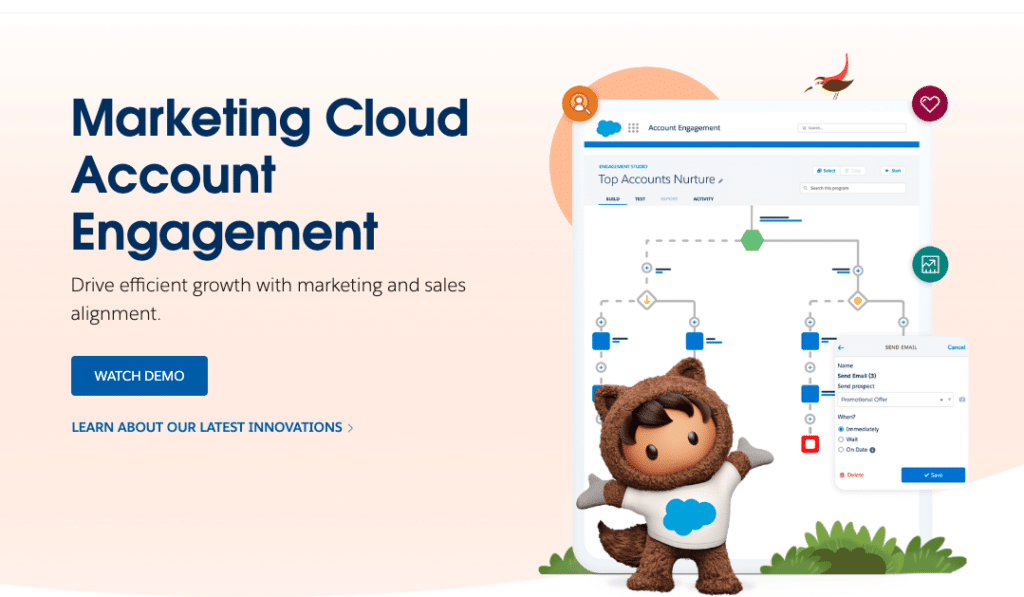
Pardot’s native Salesforce connector syncs marketing qualified leads, engagement history, and campaign attribution data directly into Salesforce records. Sales reps see exactly how a prospect has engaged with marketing before picking up the phone. The integration supports advanced lead scoring, automated nurture sequences, and multi-touch attribution reporting.
Key features
- Bi-directional sync of prospects, leads, and contacts between Pardot and Salesforce
- Lead scoring and grading based on behavioral and demographic data pushed into Salesforce fields
- Campaign influence reporting showing marketing’s contribution to closed revenue
- Automated handoff of MQLs to sales with full engagement history visible in the CRM
- Journey Builder triggers based on Salesforce field changes
Pros
- Native Salesforce product so the integration is tight and doesn’t require third-party middleware
- Full engagement history in Salesforce means sales reps go into conversations with context
- Multi-touch attribution gives marketing clear visibility into which campaigns are driving pipeline
Cons
- Pricing is steep, particularly for smaller marketing teams
- Daily sync limits of 25,000 to 50,000 records can create bottlenecks for high-volume organizations
- Initial setup requires significant time and often specialist help
What users say
“The tight Salesforce integration is what sets Pardot apart. Our sales team finally has the context they need before every call.” — Marketing Manager, Salesforce AppExchange
Pricing
Starts at $1,500/month for the Growth tier. Advanced tiers reach $12,500/month.
Other options worth considering
HubSpot Marketing Hub for teams that want marketing automation with a more accessible price point and a strong native Salesforce integration. Marketo for enterprise marketing teams that need deeper segmentation and account-based marketing capabilities.
6. Collaboration: Slack
Best for: Teams that need Salesforce updates to reach people where they already work

Salesforce owns Slack, so the integration between the two is about as tight as it gets. Teams can share Salesforce records, opportunities, and account data directly into Slack channels, receive real-time CRM update notifications, and take action on records without leaving the conversation. For revenue teams it’s particularly useful for deal alerts, pipeline update notifications, and keeping distributed teams aligned without everyone needing a Salesforce login.
Key features
- Share Salesforce records and opportunities directly into Slack channels or DMs
- Real-time notifications when Salesforce records change, deals advance, or thresholds are hit
- In-Slack record actions so reps can update fields without switching to Salesforce
- Dedicated account and opportunity channels with automatic update feeds
- AI Workflow Builder on Business+ plans for automated Salesforce-triggered Slack actions
Pros
- Meets reps and managers where they already spend their time rather than requiring them to check Salesforce for updates
- Deal alert notifications mean nothing falls through the cracks during fast-moving sales cycles
- Native Salesforce ownership means the integration is actively maintained and deepens with each release
Cons
- Notification volume can become overwhelming without thoughtful alert configuration
- Advanced integration features require Business+ licensing on top of existing Salesforce costs
- Teams that don’t already use Slack won’t find value here
What users say
“Integrating Salesforce and Slack via channels has cut our mean time to resolution by 30%.” — Salesforce Admin, Salesforce Success Community
Pricing
Business+ at $15/user/month includes the deepest Salesforce integration features. Enterprise Grid is custom pricing.
Other options worth considering
Microsoft Teams for organizations running on the Microsoft stack where Teams is already the primary communication tool. Chatter, Salesforce’s native collaboration layer, for teams that want Salesforce-native discussions without adding another communication platform.
7. E-signatures: DocuSign
Best for: Sales teams closing deals faster by removing contract friction

DocuSign lets reps send, track, and collect signatures on contracts directly within Salesforce. When a deal reaches the contract stage, reps generate and send the agreement without switching tools. Signed documents sync back to the Salesforce opportunity automatically. For teams where contract delays are a consistent friction point in the sales cycle, this integration directly reduces time to close.
Key features
- Send, track, and collect signatures on contracts from within Salesforce
- Automatic sync of signed documents back to the relevant Salesforce opportunity or account
- Reusable contract templates pre-populated with Salesforce field data
- Automated approval workflows triggered by Salesforce stage changes
- Audit trail and compliance tracking stored alongside Salesforce records
Pros
- Removes the context switch between Salesforce and document signing that slows deal velocity
- Pre-populated templates reduce errors from manual data entry in contracts
- Signed documents stored directly in Salesforce means no chasing attachments through email
Cons
- Pricing scales with envelope volume which adds up quickly for high-volume sales teams
- Setup and template configuration takes time for organizations with complex contract structures
- Some users report occasional sync delays between DocuSign and Salesforce records
What users say
“DocuSign’s Salesforce integration has cut our contract turnaround time in half. Reps never have to leave Salesforce to get a deal signed.” — Sales Operations Manager, G2
Pricing
Starts at $10/month for basic plans. Enterprise pricing varies based on envelope volume and features.
Other options worth considering
PandaDoc for teams that want document generation and e-signatures combined at a more accessible price point. Adobe Acrobat Sign for organizations already invested in the Adobe ecosystem.
Best Salesforce connectors for Revenue & Data Teams
If integrations are about adding functionality to Salesforce, connectors are specifically about moving data between Salesforce and other systems reliably and automatically. Here’s how the main connector categories break down.
Spreadsheet connectors
Spreadsheet connectors sync Salesforce data into Google Sheets or Excel so teams can analyze, report, and act on CRM data without manual exports or requiring Salesforce licenses for every person who needs to see the numbers.
1. Coefficient
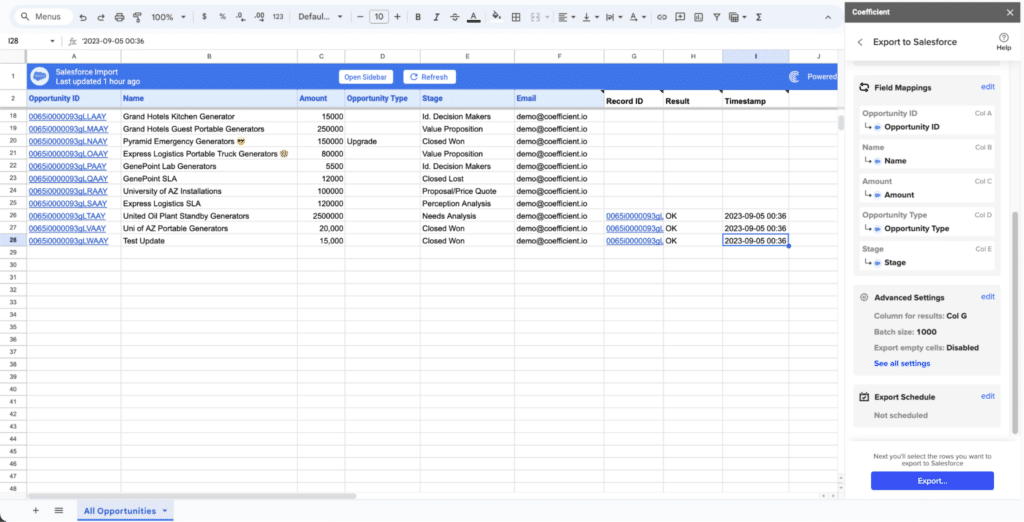
The strongest option for teams that need more than basic data pulls. Coefficient supports live two-way sync, imports from Salesforce reports, objects, or SOQL queries, connects to 100+ additional data sources beyond Salesforce, and includes an AI-powered dashboard builder. It’s built for teams doing serious analysis and reporting in a spreadsheet environment, not just viewing static snapshots.
Key features
- Live two-way sync between Salesforce and Google Sheets or Excel
- Import from Salesforce reports, objects, or custom SOQL queries
- Connect Salesforce data with 100+ other sources in the same sheet
- Auto-refresh on hourly, daily, or weekly schedules
- AI chat interface to build and publish live web dashboards
- SOC 2 Type II compliant
Pros
- Multi-source data blending across Salesforce, HubSpot, Snowflake, and more in a single sheet
- AI dashboard builder lets non-technical users publish BI-quality dashboards without a data team
- Two-way sync means reps can update Salesforce records in bulk from a spreadsheet
Cons
- Full feature set including hourly refresh and advanced automation requires a paid plan
- Works best for teams already using Google Sheets or Excel
What users say
“The sheer brilliance of easily syncing any data from any source into Google Sheets is just amazing. It’s dead simple to use, works smoothly, and gets the job done.” — G2 reviewer
Pricing
Free tier available. Paid plans from $49/user/month.
2. Salesforce Data Connector for Google Sheets
Google’s native option. Free with qualifying Salesforce editions and handles basic imports and scheduled refreshes for teams with simple Salesforce-only reporting needs. Worth noting that Salesforce discontinued support for this connector in Fall 2024, so you’re on your own if something breaks.
Key features
- Basic Salesforce report imports into Google Sheets
- Scheduled refresh on a fixed interval
- Manual data push back to Salesforce
Pros
- Free with qualifying Salesforce and Google Workspace licenses
- No setup complexity for basic one-directional use cases
Cons
- Support discontinued in Fall 2024
- Salesforce data only, no multi-source blending
- No two-way sync or AI features
Pricing
Free with qualifying Salesforce and Google Workspace licenses.
4. XL-Connector
The Excel-native equivalent from Xappex. Built specifically for Excel users who need to pull Salesforce data, run bulk updates, and manage records without leaving the spreadsheet. It doesn’t connect to other data sources beyond Salesforce but for teams who live in Excel and only need Salesforce data, it’s a capable option.
Key features
- Direct Salesforce data imports into Excel
- Bulk update and insert operations from the spreadsheet
- Scheduled automatic data refreshes
- Offline data editing with sync on reconnect
Pros
- Deep Excel integration with a familiar interface
- Strong bulk operation support for Salesforce admins
- Offline capability for field teams
Cons
- Salesforce data only, no connections to other sources
- Limited to Excel, no Google Sheets support
- No AI features or dashboard builder
Pricing
From $20/user/month.
Workflow automation connectors
Workflow connectors sit between Salesforce and other apps, triggering automated actions when something changes in either system. They’re useful for teams that need to automate handoffs between tools without writing custom code.
1. Zapier
The most accessible entry point for Salesforce workflow automation. Connects Salesforce to 7,000+ apps through simple trigger-action pairs with no coding required. Works well for straightforward automations like creating a Salesforce lead when a form is submitted or sending a Slack message when a deal closes. Its limitations show up with complex bidirectional sync or high-volume data operations.
Key features
- Trigger-action automation between Salesforce and 7,000+ apps
- No-code workflow builder
- Pre-built Zap templates for common Salesforce workflows
- Multi-step Zaps available on paid plans
Pros
- Fastest way to get a basic Salesforce automation running without engineering help
- Huge app library covers almost any tool in your stack
- Free tier available for simple single-step automations
Cons
- Not suited for complex multi-step automations or enterprise-scale data volumes
- Bidirectional sync with Salesforce has limitations compared to purpose-built connectors
- Costs scale quickly as automation volume grows
Pricing
Free plan available. Paid plans from $19.99/month.
2. Workato
Handles more sophisticated workflow automation than Zapier with 1,200+ connectors, intelligent triggers, and complex data mapping capabilities. Better suited for mid-market and enterprise teams running multi-step automations across Salesforce and several other business systems simultaneously.
Key features
- 1,200+ pre-built connectors including deep Salesforce support
- Complex multi-step recipe builder with conditional logic
- Enterprise governance controls and audit logging
- Real-time triggers based on Salesforce record changes
Pros
- Handles complex multi-system orchestration that Zapier can’t
- Strong governance and audit controls for enterprise compliance requirements
- Active community with 400,000+ shared automation recipes
Cons
- Steeper learning curve than Zapier
- Custom pricing that tends to be expensive for smaller teams
- Overkill for teams with simple automation needs
Pricing
Custom pricing.
3. MuleSoft Anypoint Platform
Salesforce’s own enterprise integration platform. Supports every Salesforce API surface, handles millions of transactions daily, and is built for organizations with complex multi-system architectures and dedicated integration teams. Mid-sized deployments start around $250,000 per year. This is enterprise infrastructure, not a tool for teams that need a quick connection.
Key features
- Full access to every Salesforce API including REST, SOAP, Bulk, and Streaming
- 1,200+ enterprise connectors across cloud, on-premises, and legacy systems
- API lifecycle management with governance and monitoring built in
- Agentforce integration for AI agent workflows
Pros
- Deepest Salesforce API access available of any integration platform
- Enterprise-grade governance, compliance, and monitoring
- Scales to millions of transactions daily without performance degradation
Cons
- Mid-sized deployments start at approximately $250,000 per year
- Requires dedicated integration engineers to implement and maintain
- Overkill for the vast majority of revenue teams
Pricing
Mid-sized deployments from approximately $250,000/year.
Data warehouse connectors
Data warehouse connectors move Salesforce data into platforms like Snowflake, BigQuery, or Redshift so it can be combined with other data sources for analytics at scale.
1. Devart ODBC Driver for Salesforce
Devart ODBC Driver for Salesforce is a high-performance data connector for developers and data analysts. It provides direct access to Salesforce from any ODBC-compliant reporting, analytics, BI, or ETL tool, across 32-bit and 64-bit systems.
Features:
- Simple installation across multiple computers
- Instant access to real-time data from any location
- Full Unicode support for global usage
- Secure authentication with OAuth 2.0
Pros
- Easy way to query Salesforce from external tools
- Good fit for analytics and data integration workflows
Cons
- May be better suited to enterprise teams with established data workflows than smaller teams with simpler needs
- Pricing can be a hurdle for smaller teams
What users say
Finding this product had a very positive effect because it allowed me meet the needs of those in my org that wanted to use Salesforce while allowing me to keep our org running on the time-tested solution that works. – VP Data Management, G2
Pricing
Starts at $179 for Desktop edition, with a free trial available.
Other options worth considering
Devart SSIS Data Flow Components for Salesforce for teams using SSIS and needing a more ETL-focused Devart tool. dotConnect for Salesforce for .NET teams building apps with direct Salesforce connectivity.
2. Fivetran
The most widely used option for Salesforce-to-warehouse pipelines. Handles extraction, normalization, and loading automatically, keeps schemas in sync as your Salesforce data model changes, and supports all major cloud warehouses. A strong choice for data teams building a centralized analytics layer.
Key features
- Fully managed Salesforce extraction and loading into Snowflake, BigQuery, Redshift, and more
- Automatic schema updates as your Salesforce data model changes
- Change data capture for near real-time data freshness
- Pre-built connectors for 300+ data sources beyond Salesforce
Pros
- Fully managed pipeline means no maintenance overhead for the data team
- Automatic schema drift handling prevents pipeline breakages when Salesforce fields change
- Broad warehouse support covers all major cloud platforms
Cons
- Pricing scales with data volume and can become expensive at scale
- Requires a data warehouse to be useful, adding infrastructure cost
- Not the right tool if you just need Salesforce data in a spreadsheet
Pricing
Custom pricing based on monthly active rows.
How to choose the right Salesforce integration or connector
The most common mistake teams make is choosing tools based on feature lists rather than the specific workflow they’re trying to fix. Before evaluating anything, get clear on the actual problem.
If your team spends time on manual Salesforce exports and spreadsheet maintenance: A spreadsheet connector like Coefficient eliminates the export cycle entirely and keeps your data live.
If reps are logging activity manually and CRM data is consistently incomplete: A sales engagement integration like Outreach automates activity logging so the data is accurate without asking reps to do extra work.
If sales managers don’t know what’s actually happening on calls: Gong gives them visibility through recorded and analyzed conversations tied directly to Salesforce records.
If CRM records are full of missing or outdated contact data: ZoomInfo enriches and maintains records automatically so your pipeline data reflects reality.
If contract delays are consistently slowing down deal velocity: DocuSign removes the context switch between Salesforce and your document signing workflow.
If you need Salesforce data inside a warehouse for broader analytics: Fivetran handles the pipeline. If you want that data in a spreadsheet alongside other sources, Coefficient covers both without the infrastructure overhead.
Frequently asked questions
What is the best free Salesforce connector?
Coefficient has a free tier that includes live Salesforce data sync into Google Sheets with no row limits on imports. Google’s native Salesforce Data Connector for Sheets is also free but support was discontinued in late 2024. Zapier has a free plan for basic workflow automation but it’s limited to single-step Zaps.
Do I need a Salesforce admin to set up third-party integrations?
As of September 2025, yes. Salesforce now requires all third-party connected apps to be explicitly approved and installed by a Salesforce admin before users can authenticate. Plan for this in your setup timeline.
Can I connect Salesforce to Google Sheets without a paid tool?
Yes, through Google’s native Salesforce Data Connector, though support was discontinued in late 2024 and it only connects to Salesforce with no two-way sync. If you need reliable ongoing support, multi-source data, or writeback capabilities, a paid connector like Coefficient is worth the investment.
What is the best Salesforce integration for RevOps teams?
Coefficient for live data and reporting, Outreach for sales activity data quality, Gong for pipeline intelligence from call data, and ZoomInfo for keeping records clean. Most RevOps teams use a combination depending on where their data gaps are.
This post was originally published on October 2024, revamped with updated tools, pricing, and other info in March 2026.