

Here is an uncomfortable stat: 60% of self-service BI projects fail to deliver business value, and adoption rates have been stuck at around 25% for nearly a decade. The problem is almost never the tool. It is the operating model.
Self-service only works reliably when someone owns and maintains the data layer, and everyone else queries on top of it. Tools without a governed semantic layer create the “which dashboard is right?” problem at scale, where different teams pull conflicting numbers from the same source and leadership stops trusting the data entirely.
Five criteria determine whether a BI tool is genuinely self-service for business users, not just for data analysts:
- Time from question to answer without IT involvement
- Natural language querying that works reliably for non-technical users
- Connection to data sources business teams actually use day-to-day
- Governance controls that prevent conflicting reports across teams
- Whether it requires a dedicated BI team to build and maintain the underlying models
This list spans a spectrum: from enterprise platforms to spreadsheet-native tools. Self-service means different things depending on team size, technical depth, and existing stack.
Self-Service BI Tools Compared: Quick Reference
| Tool | Technical Skill Needed | Works in Existing Spreadsheet | AI Natural Language Interface | Starting Price |
| Coefficient | Low | Yes | Yes (AI GPT Assistant) | From $49/month |
| Domo | Medium | No | Yes (Domo.AI) | Custom quote |
| Microsoft Power BI | Medium | Yes | Yes (Copilot) | $14/user/month |
| Tableau | High | No | Limited | $70/user/month (Creator) |
| ThoughtSpot | Low | No | Yes (SpotIQ) | Custom, $95k+ /year |
| Looker | High | No | Limited | Custom, $30k+ /year |
| Zoho Analytics | Low | No | Yes (Zia) | From $30/month |
| Ajelix BI | Low | No | Yes | From $15/month |
At a glance:
- Coefficient: Best for teams already working in Excel or Google Sheets
- Domo: Best for enterprise teams wanting a single cloud BI platform
- Microsoft Power BI: Best for Microsoft-stack organizations
- Tableau: Best for analysts building visual stories from complex data
- ThoughtSpot: Best for natural language querying on large datasets
- Looker: Best for developer-led BI implementations with a semantic layer
- Zoho Analytics: Best for SMBs wanting affordable BI without IT overhead
- Ajelix BI: Best for small teams that need AI-assisted reporting fast
Coefficient
Best for: Teams already working in Excel or Google Sheets
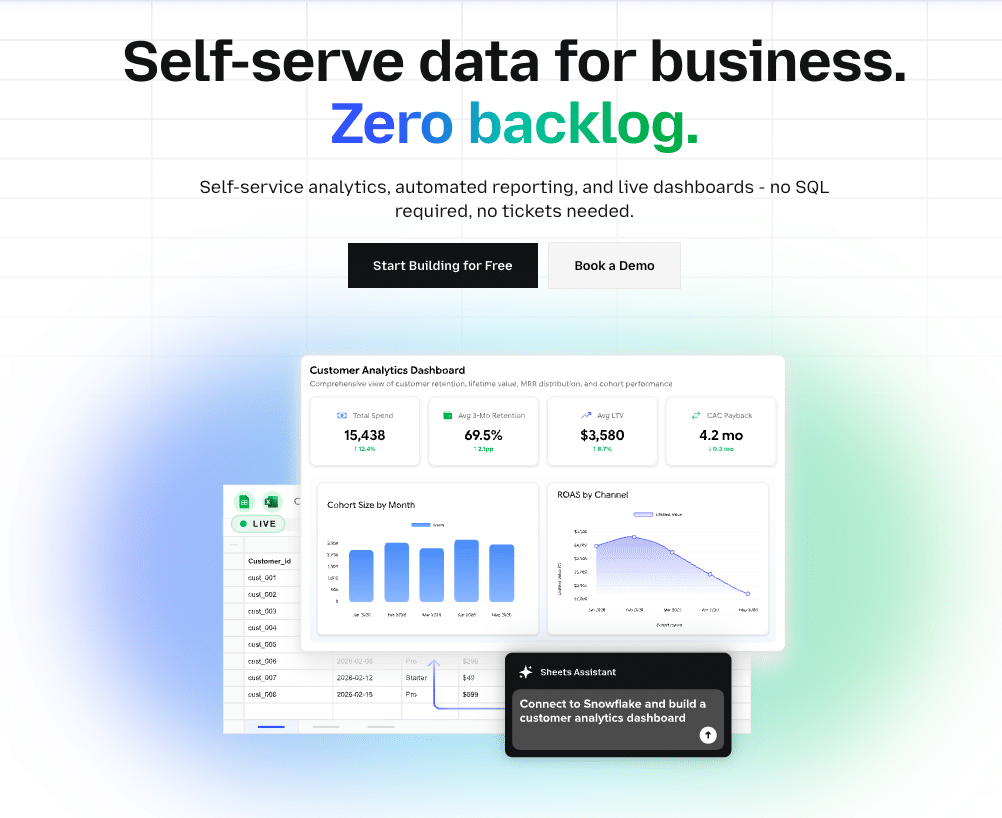
Coefficient is the only tool on this list that does not require leaving the spreadsheet. For finance, ops, and RevOps teams whose self-service bottleneck is getting live data into their analysis workflow rather than learning a new BI platform, Coefficient connects 100+ sources directly into Excel or Google Sheets.
CRM data from Salesforce or HubSpot, financial data from QuickBooks or NetSuite, ad performance from Google Analytics or Meta Ads, warehouse data from Snowflake or BigQuery: all of it lands in the spreadsheet on a scheduled refresh your team controls. No tickets to IT. No waiting on a data team. No exporting and reimporting.
The AI Sheets Assistant adds formula generation, data cleaning, and chart creation from within the spreadsheet. One-click web dashboard publishing turns any model into a shareable, auto-updating dashboard accessible via URL.
Limitations: Coefficient is not a traditional BI platform. It is self-service for teams whose workflow is already spreadsheet-native. If your team needs a standalone BI environment with a centralized data catalog, data governance at the warehouse level, or complex multi-source joins, a dedicated BI tool will serve you better.
Pricing: Starts at $49/month. No per-user fees. No annual contract required.
Pros:
- Zero migration: works inside Excel and Google Sheets
- 100+ connectors covering finance, CRM, marketing, and data warehouse
- Scheduled refresh, two-way writeback, AI analysis, dashboard publishing
- Flat pricing, same-day setup, no implementation fees
Cons:
- Not a standalone BI platform with a centralized data catalog
- AI Sheets Assistant currently limited to Google Sheets
Domo
Best for: Enterprise teams wanting a single cloud BI platform
Domo is a cloud-native, mobile-first BI platform built for enterprises that want a single environment for data integration, visualization, and sharing. Its connector library covers 1,000+ data sources, and Domo.AI adds natural language querying that makes the platform more accessible for non-technical users.
For organizations that want one platform to handle the full data-to-dashboard workflow at scale, Domo is one of the most capable options available. The mobile experience is genuinely strong compared to most competitors.
Limitations: High enterprise cost is the primary barrier. Implementation is complex, and the learning curve for building and maintaining Domo content can undermine the self-service promise for non-technical users who are not regularly engaged with the platform. Support from an internal Domo champion is often needed to sustain adoption.
Pricing: Custom quote only. Enterprise contracts typically run $50,000 to $200,000+ per year.
Pros:
- Cloud-native, mobile-first, wide connector library
- Strong governance and admin controls for enterprise use
- Domo.AI enables natural language querying
Cons:
- High cost, complex implementation
- Learning curve undermines self-service for casual users
Microsoft Power BI
Best for: Microsoft-stack organizations
Power BI dominates the BI market for organizations already on Microsoft 365. Deep Excel integration, Azure connectivity, and Teams embedding make it the natural choice for companies standardized on the Microsoft stack. The connector library is broad, and Copilot integration on premium plans adds AI-assisted report generation.
The self-service reality: Power Query for data transformation and DAX for custom measures are powerful but not intuitive for business users without formal training. In practice, IT or a dedicated BI analyst usually owns the data model, and business users query on top of it. That is a reasonable operating model, but it is managed self-service, not true self-service.
Limitations: Per-viewer licensing means every person who views a published report needs a paid license. For organizations sharing reports across marketing, finance, sales, and leadership, the licensing cost compounds quickly. Copilot requires Premium Per User, adding further cost.
Pricing: Free tier available. Pro at $14/user/month. Premium Per User at $24/user/month (includes Copilot).
Pros:
- Deep Microsoft ecosystem integration
- Affordable entry point for small teams
- Broad connector library and large support community
Cons:
- DAX and Power Query have steep learning curves
- Per-viewer licensing adds up at scale
- IT typically ends up owning the data model
Tableau
Best for: Analysts building visual stories from complex data
Tableau’s visualization quality remains the benchmark in the category. For data and analytics teams building polished, interactive dashboards that present complex data to senior stakeholders, Tableau produces output that most tools cannot match on aesthetics and interactivity alone.
The self-service limitation is worth understanding clearly. Tableau is self-service for data analysts who know how to prepare and structure data. For the average finance manager, marketing director, or ops lead who wants to pull their own numbers, Tableau is not a walk-up tool. Getting data into Tableau requires preparation, and building a functional dashboard from scratch has a real learning curve.
Limitations: Creator licenses are expensive at $70/user/month. Post-Salesforce acquisition, Tableau’s roadmap is increasingly oriented toward the Einstein and Agentforce ecosystem, which may not align with organizations that are not Salesforce customers.
Pricing: Creator at $70/user/month. Explorer at $42/user/month. Viewer at $15/user/month.
Pros:
- Best-in-class visualization and interactive dashboard quality
- Strong for executive reporting and stakeholder-facing analytics
- Large ecosystem and community support
Cons:
- Not self-service for non-technical users
- Expensive Creator licensing
- Requires data preparation before visualization work can begin
ThoughtSpot
Best for: Natural language querying on large datasets
ThoughtSpot’s SpotIQ engine and natural language search are genuinely differentiated. Business users can type a question in plain English and get a visualized answer without writing SQL or building a report. For organizations with a modern cloud data warehouse and users who need to ask ad hoc questions against large datasets, ThoughtSpot delivers on its self-service promise in a way that most BI tools do not.
The prerequisite matters: ThoughtSpot requires a cloud data warehouse (Snowflake, Google BigQuery, Amazon Redshift, or similar) as its data foundation. It is not a self-contained tool. Teams without existing warehouse infrastructure will need to build that layer first.
Limitations: ThoughtSpot is expensive, with enterprise contracts often in the $100,000+ range. It is best suited for data-mature organizations that already have a warehouse, a data team maintaining the semantic layer, and a budget to match.
Pricing: Custom quote only. Enterprise contracts typically start at $95,000 to $150,000+ per year.
Pros:
- Best-in-class natural language querying for non-technical users
- SpotIQ auto-generates insights from your data without prompting
- Strong warehouse-native performance at scale
Cons:
- Requires existing cloud data warehouse infrastructure
- Expensive, best suited for data-mature enterprises
Looker
Best for: Developer-led BI implementations with a semantic layer

Stop exporting data manually. Sync data from your business systems into Google Sheets or Excel with Coefficient and set it on a refresh schedule.
Get Started
Looker’s LookML semantic layer is its defining feature. It allows data teams to define business logic, metrics, and calculations in a centralized, version-controlled model. Once that model is built, business users can explore, filter, and report against it without worrying about pulling conflicting numbers or misdefining key metrics.
For organizations that have been burned by the “which dashboard is right?” problem, Looker’s governed approach is genuinely appealing. Google Cloud integration strengthens the case for GCP-native teams.
Limitations: Building and maintaining LookML requires dedicated engineering resources. Looker is self-service for business users only after significant upfront engineering investment. The platform is expensive, and its pricing for embedded use cases adds further complexity. Teams without a data engineer are not ready for Looker.
Pricing: Custom quote only. Typical contracts range from $30,000 to $150,000+ per year.
Pros:
- LookML semantic layer prevents conflicting reports across teams
- Strong data governance for enterprise analytics
- Google Cloud integration is a strength for GCP environments
Cons:
- Requires engineering resources to build and maintain LookML
- Not self-service until the data layer is fully built
- Expensive and complex for smaller teams
Zoho Analytics
Best for: SMBs wanting affordable BI without IT overhead
Zoho Analytics punches above its weight for small and mid-sized businesses. The connector library is wide, the drag-and-drop interface is accessible for non-technical users, and the Zia AI assistant handles natural language queries for teams that want basic question-and-answer capability without enterprise pricing.
For SMBs already in the Zoho ecosystem (Zoho CRM, Zoho Books, Zoho Projects), the integration depth is a genuine advantage. Teams can get a unified analytics view across their Zoho stack without involving IT.
Limitations: The interface feels dated compared to newer tools like ThoughtSpot or Looker. Deep customization requires familiarity with Zoho’s ecosystem, and organizations not using other Zoho products lose some of the native integration advantage.
Pricing: Starts at $30/month for up to 2 users. Scales by user count. Business plan at $145/month for up to 15 users.
Pros:
- Affordable, accessible for non-technical users
- Wide connector library, Zia AI assistant
- Strong value for Zoho ecosystem users
Cons:
- Dated UI compared to newer BI tools
- Deep customization requires Zoho ecosystem familiarity
Ajelix BI
Best for: Small teams that need AI-assisted reporting fast
Ajelix is a newer, lighter BI tool built around AI-driven report generation. The pitch is speed: describe the report or dashboard you need, and Ajelix builds the structure for you. Formula assistance, auto-generated insights, and a low price point make it an accessible entry point for lean teams that need reporting capability without the overhead of an enterprise BI platform.
For small ops, marketing, or sales teams that need to surface basic metrics from a handful of sources without involving IT, Ajelix delivers on its core promise faster than most tools on this list.
Limitations: Ajelix is early-stage in ecosystem maturity. The connector library is narrower than established tools, scalability for large data volumes is less proven, and the governance and admin controls available in enterprise platforms are not yet present. It is a good fit for teams that need reporting now, not teams planning for enterprise-scale analytics.
Pricing: Free plan available. Paid plans from $15/month.
Pros:
- Fast setup, AI-assisted report generation
- Affordable for small teams
- Accessible for non-technical users
Cons:
- Narrower connector library than established platforms
- Limited governance and admin controls
- Less proven for large-scale data volumes
How to Pick the Right Self-Service BI Tool
Match the tool to your infrastructure and team maturity, not just your feature wishlist.
No data warehouse, spreadsheet-native workflow: Coefficient or Zoho Analytics. Both work without warehouse infrastructure and are accessible for non-technical users.
Data warehouse already in place with an engineering resource: Looker for governed, semantic-layer analytics. ThoughtSpot for natural language querying on large datasets.
Microsoft shop standardized on 365: Power BI is the obvious choice. The integration advantage outweighs the learning curve for most Microsoft-centric teams.
Executive dashboards with strong visual quality as the priority: Tableau, particularly for Salesforce-adjacent organizations.
Enterprise, mobile-first, all-in-one platform: Domo, for organizations with the budget and implementation resources to support it.
Small team moving fast on a limited budget: Ajelix BI or Zoho Analytics get you to working reports faster than any enterprise tool.







