

Summary
Everstage has emerged as a modern alternative for automating sales compensation. But in 2026’s competitive landscape, understanding actual costs matters more than marketing promises.
Most mid-market teams face a key question: Does modern commission software justify the investment? Or can workflow automation tools solve the same tracking problem at a fraction of the cost?
This guide breaks down Everstage’s actual costs, reveals fees beyond base pricing, and helps you decide which solution fits your team size and budget.
What is Everstage?
Everstage is sales compensation software designed for mid-market and enterprise sales teams. The platform automates commission calculations through no-code plan builders and real-time dashboards.
Instead of exporting data from your CRM and building commission formulas manually, Everstage connects directly to Salesforce and other systems to calculate payouts automatically.
Key Features
The platform includes five core capabilities:
No-code plan builder. Configure tiered rates, accelerators, draws, and SPIFFs without writing code. Finance teams design complex commission structures through visual interfaces.
Automated commission processing. Run calculations daily, weekly, or monthly. The system handles everything from simple flat-rate commissions to multi-tiered structures with accelerators.
Real-time rep visibility. Sales reps see current earnings, quota attainment, and forecasted commissions through web dashboards and mobile apps. Eliminates “shadow accounting” where reps track their own earnings.
Native CRM integrations. Direct connections to Salesforce, HubSpot, NetSuite, and other business systems pull deal data automatically. No manual exports or data entry.
Gamification and leaderboards. Built-in competition features motivate reps through rankings, achievements, and performance comparisons.
Who Uses Everstage
Everstage targets mid-market companies (200-1,000 employees) and growing enterprises managing 50+ commissioned reps. The platform works best for teams transitioning from spreadsheets who need transparency and automation.
Common users include SaaS companies with inside sales teams, business services firms with complex commission structures, and financial services organizations requiring compliance and audit trails.
According to the company’s own data, customers include companies like Notion, Trimble, Chargebee, and Postman. The platform maintains a 4.9/5 rating across G2, Gartner Peer Insights, and TrustRadius based on 1,500+ reviews.
Everstage Pricing Overview
Everstage operates on a custom quote-based pricing model. No pricing tiers appear on their website. You contact sales for quotes based on your specific requirements.
According to industry analysis, sales compensation platforms typically range from $15-$75 per user per month. Entry-level implementations start around $2,000-$5,000 annually for very small teams.
What Real Buyers Pay
Based on industry reports and user feedback, here’s what organizations typically spend:
20-50 reps: $10,000-$30,000 annually
50-100 reps: $30,000-$60,000 annually
100-250 reps: $60,000-$100,000+ annually
These numbers represent base software subscriptions. Implementation, training, and integration costs come on top.
👉 For teams with fewer than 50 reps or annual RevOps budgets under $15K:
The pricing breakdown below may not justify ROI for your team size. Skip to spreadsheet-based automation like Coefficient that solves the same problem at $500-$3K/year.
The Pricing Model
Everstage charges per user (or per payee) with annual contracts. Most contracts run 12 months with standard renewal terms.
Final pricing depends on several factors:
- Number of payees (sales reps, managers, and admins who receive commissions)
- Commission plan complexity (multi-tiered structures, accelerators, team-based quotas)
- Integration requirements (number of systems beyond standard Salesforce/HubSpot)
- Enterprise features (advanced security, compliance, dedicated support)
One Vendr buyer reported: “For our new purchase, we were able to waive 100% Implementation fees, 60% off our Support fees, and 30% off our Users.”
This suggests implementation and support fees are standard charges that can be negotiated.
Everstage Pricing Plans Breakdown
Based on user feedback and industry data, two main configurations emerge: a growth tier for 50-100 reps and an enterprise tier for 100+ reps.
Growth/Mid-Market Plan
Pricing & What’s Included
Mid-market contracts typically cost $30,000-$60,000 per year for teams with 50-100 sales reps. That breaks down to roughly $300-$600 per rep annually.
What’s Included:
- No-code commission plan builder with templates
- Automated commission calculations (daily, weekly, or monthly runs)
- Salesforce and HubSpot integrations
- Real-time dashboards for reps, managers, and finance
- Mobile apps (iOS and Android)
- Commission statements with deal-level breakdowns
- Dispute resolution workflows
- Standard support (email and in-app chat)
Limitations:
Integration depth may be limited to 2-3 primary systems. Custom integrations or advanced data warehouse connections may require additional fees or development work.
Standard support includes email and chat during business hours. Priority support with faster response times typically requires enterprise contracts.
Additional Costs to Expect
Beyond base subscription pricing, budget for these expenses:
Implementation fees: $5,000-$15,000
One Capterra reviewer noted: “The onboarding process was very smooth and cost effective.” However, another buyer on Vendr mentioned negotiating to “waive 100% Implementation fees,” suggesting these fees are normally charged.
Implementation typically takes 2-6 weeks and includes data migration, plan configuration, and user training.
Support fees: Variable
The same Vendr buyer reported negotiating “60% off our Support fees,” indicating support may be a separate line item depending on your contract structure and support tier requirements.
Estimated First-Year Cost
| Cost Component | Amount |
|---|---|
| Subscription | $30,000-$60,000 |
| Implementation | $5,000-$15,000 (often negotiable) |
| Support fees | Varies by contract |
| Total first-year investment | $35,000-$75,000 |
Best Suited For
This tier works best for mid-market companies with 50-150 sales reps managing moderate to complex commission structures.
Good fits include SaaS companies transitioning from spreadsheets, business services firms with team-based incentives, and organizations where commission disputes currently consume 10-20 hours per week of finance or RevOps capacity.
The sweet spot: Teams currently using spreadsheets where commission errors cause rep complaints. Manual calculation processes that delay payouts beyond month-end close.
Enterprise Plan
Custom Pricing Structure
Enterprise contracts typically range $60,000-$100,000+ annually for organizations with 100-250+ sales reps.
One Capterra user captured the value proposition: “If you have small team then this may feel expensive, I remember in previous company when we were reviewing it, was little costlier than other options.”
What Drives Custom Pricing:
- Total payee count (every commissioned employee adds cost)
- Geographic distribution (multi-currency, regional compliance)
- Data volume (frequency of calculations, number of transactions)
- Integration complexity (data warehouses, custom APIs, multiple ERPs)
- Enterprise security requirements (SOC 2, GDPR, custom compliance)
Enterprise Features:
All growth plan features plus:
- Dedicated customer success manager
- Priority support with faster SLAs
- Advanced security and compliance (SOC 2 Type II, ISO 27001, GDPR, CCPA)
- API access for custom integrations
- Territory and quota planning modules
- Advanced analytics and forecasting
- Multi-entity support
- White-glove onboarding and training
- Custom data warehouse integrations
Additional Costs to Expect
Enterprise implementations involve higher setup investment:
Implementation fees: $10,000-$30,000+
Larger teams with complex multi-region structures require more extensive professional services. Implementation timelines extend to 2-3 months for enterprises.
Custom integration development: $5,000-$20,000 per integration
Connecting to data warehouses, custom databases, or proprietary systems often requires development work billed separately.
Estimated First-Year Cost
| Cost Component | Amount |
|---|---|
| Subscription | $60,000-$100,000+ |
| Implementation | $10,000-$30,000 |
| Custom integrations | $5,000-$20,000 (if needed) |
| Total first-year investment | $75,000-$150,000+ |
When to Consider Enterprise
Enterprise pricing makes sense when you manage 100+ commissioned reps across multiple regions or business units.
Compliance requirements become triggers. Regulated industries (financial services, insurance, healthcare) requiring SOC 2 or GDPR compliance need enterprise infrastructure and audit trails.
Commission accuracy is mission-critical because calculation errors impact rep retention or create regulatory risk.
Everstage Customer Reviews & User Feedback
Overall Rating
Everstage maintains a 4.9/5 rating across G2, Gartner Peer Insights, and TrustRadius based on over 1,500 customer reviews.
The platform earned recognition as G2’s Top 100 Highest Satisfaction Products in 2024 and maintains a 97% recommendation rate on Gartner Peer Insights.
What Users Love
Real-time commission visibility eliminates disputes
Users consistently praise the transparency Everstage brings to commission tracking.
One Gartner reviewer noted: “Commission tracking in real time: The live dashboard is a big advantage. Our representatives don’t have to wait for monthly spreadsheets or chase down ops as they can log in at any time and see precisely where they stand against quota.”
No-code flexibility speeds plan changes
Finance teams appreciate the ability to modify commission plans without IT support.
A Gartner user shared: “Without developer support, we have used it to set up tiered incentives, SPIFFs and draw recoveries. Even though we had last minute modifications, the tool was supported in the middle of the quarter without breaking a sweat.”
Responsive customer support
Multiple reviews highlight Everstage’s support quality.
One Capterra reviewer stated: “Everstage offers excellent customer service, with a team that’s quick to respond and very helpful.”
Fast implementation timeline

Stop exporting data manually. Sync data from your business systems into Google Sheets or Excel with Coefficient and set it on a refresh schedule.
Get Started
Compared to legacy commission software, users report faster deployment.
A TrustRadius reviewer mentioned: “Implementation time is just a few weeks” versus months with older platforms.
Common Dissatisfaction
Daily sync delays during critical periods
Several users report synchronization timing issues.
One Capterra reviewer explained: “Daily Sync Limitations – The daily sync takes all morning, during which adding elements, locking/unlocking statements, or requesting validations isn’t possible. This can be especially problematic during closure periods.”
Limited report customization
Users seeking specific reporting formats encounter limitations.
The same Capterra reviewer noted: “Reporting – Customizing reports is challenging and not very flexible.”
Reliance on support for certain changes
Some configuration changes still require assistance from the Everstage team rather than being fully self-service.
A Capterra user mentioned: “Dependence on Support – Some changes still require assistance from the support team.”
Navigation complexity
While generally user-friendly, some users find the interface could be simpler.
One Software Advice reviewer stated: “The platform can feel overly complicated at times, and having a simplified quick reference view would make it easier to check commission on the go.”
Cost concerns for smaller teams
A Capterra reviewer captured this sentiment: “If you have small team then this may feel expensive, I remember in previous company when we were reviewing it, was little costlier than other options.”
Is Everstage Right for Your Team?
After reviewing pricing, features, and user feedback, here’s how to assess fit:
| Everstage Works Best For | Everstage May Be Overkill If |
|---|---|
| 50+ sales reps managing moderate to complex commission structures | Fewer than 50 reps ($30K-$60K/year may not justify ROI) |
| No coding expertise (need visual, no-code commission builder) | Spreadsheet-savvy teams (already comfortable with formulas) |
| High commission dispute volume (transparency reduces finance workload) | Simple flat-rate commissions (basic structures don’t need automation) |
| Rapid growth trajectory (scaling from 50 to 200+ reps in 12-24 months) | Limited budget ($10K-$20K/year RevOps spend ceiling) |
| Need for compliance (audit trails, SOC 2, GDPR required) | Rapid plan iteration (daily/weekly changes may hit sync limitations) |
For teams in the second category, spreadsheet-based workflow automation tools offer a different approach. These tools connect existing spreadsheets to CRMs for live data, letting teams calculate commissions using familiar formulas rather than learning new software.
Alternative for Spreadsheet-Savvy SMBs: Coefficient
If Everstage feels too expensive or feature-heavy for your needs, spreadsheet-based workflow automation offers a different path to solving commission tracking.
This approach works best for teams already comfortable with Excel or Google Sheets who want to automate data connections rather than replace their entire workflow.
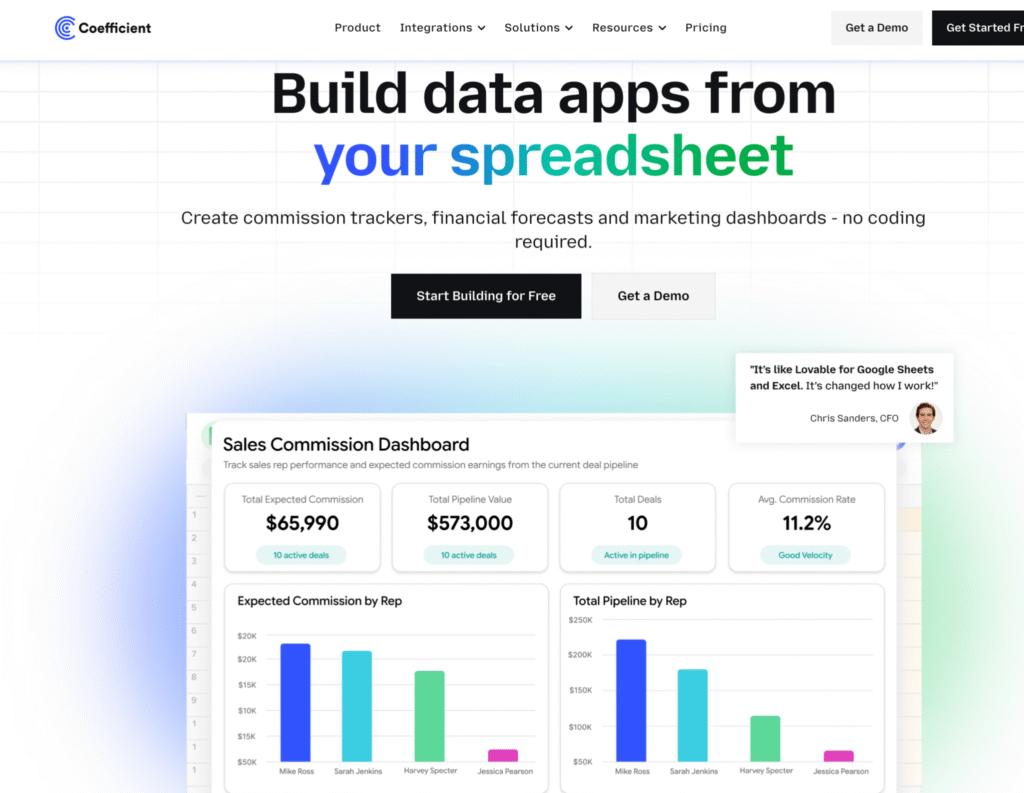
The Spreadsheet-Native Approach
Instead of learning new commission software, spreadsheet automation tools connect your existing Excel or Google Sheets directly to Salesforce, HubSpot, and other business systems.
You build commission formulas in the tools you already know. Data refreshes automatically from your CRM. No new platform to learn. No change management hurdles.
Coefficient is one such workflow automation tool designed for this use case. Finance teams and sales operations professionals use it to automate commission tracking without leaving spreadsheets.
Here’s a simple walkthrough video of the same,
How It Works
1. Connect your CRM. Link Google Sheets or Excel to Salesforce, HubSpot, or 100+ other data sources. Takes 60 seconds.
2. Build commission calculations in spreadsheets. Use familiar formulas like SUMIF, VLOOKUP, and IF statements to calculate commissions based on live CRM data. Or copy pre-built templates.
3. Schedule automatic refreshes. Set data to refresh hourly, daily, or weekly. Commission numbers update automatically as deals close in your CRM.
4. Share view-only dashboards. Reps check their earnings in shared Google Sheets with view-only access. No separate login required.
One finance team at Jebbit (a marketing SaaS company) used this approach to eliminate hours of manual commission work. Their VP of Finance Rachel Golden noted in Coefficient’s case study: “Coefficient saved us hours upon hours of work. There’s no manual back-and-forth with salespeople about commissions anymore.”
Best For
This spreadsheet automation approach works best for:
SMBs with fewer than 50 reps. Where $30,000-$60,000 annual commission software spend exceeds budget constraints.
Spreadsheet-comfortable teams. Finance professionals who already build reports and dashboards in Excel or Google Sheets.
Budget-conscious organizations. Where $588-$1,188/year fits budgets better than $30,000+/year.
Teams wanting broader automation. Need commission tracking plus pipeline forecasting, quota analysis, and other RevOps reporting in one tool.
What You Trade Off
To provide balanced guidance, spreadsheet automation doesn’t replicate everything dedicated commission software offers:
No visual plan builder. You build commission logic with formulas, not drag-and-drop interfaces.
No built-in gamification. Leaderboards and competition features require manual setup or separate tools.
No dispute resolution workflows. Formal dispute tracking requires comments in spreadsheets or external ticketing systems.
For teams prioritizing cost efficiency, spreadsheet familiarity, and formula flexibility, these trade-offs feel minor. For teams needing visual builders, gamification, and structured workflows, dedicated software justifies the premium.
Cost Comparison
| Scenario | Everstage | Coefficient |
|---|---|---|
| Starting price | Contact sales ($10K+ typical) | $588/year |
| Mid-tier (50-100 reps) | $30,000-$60,000/year | $1,188/year (Pro) |
| Enterprise (100+ reps) | $60,000-$100,000+/year | $2,940/year (Enterprise) |
| Implementation | $5,000-$15,000 (negotiable) | $0 (same-day setup) |
| Integrations | Salesforce, HubSpot standard | 100+ pre-built (all plans) |
The bottom line: Both solve commission tracking. Everstage offers modern, no-code commission software with gamification and white-glove support. Spreadsheet automation tools like Coefficient solve the same problem through workflow automation at dramatically lower cost.
Your choice depends on team size, budget, and whether your team prefers visual builders or familiar spreadsheet formulas.
Conclusion
Everstage is modern, user-friendly software purpose-built for sales commission management. However, for many SMBs with fewer than 50 sales reps, the platform often exceeds actual needs.
The key question isn’t “Is Everstage good?” The platform clearly works for mid-market teams based on reviews. The real question is: “Does your team need dedicated commission software, or can workflow automation solve the same problem through a different approach?”
For spreadsheet-comfortable teams with tighter budgets, tools like Coefficient automate commission tracking at $588-$1,188/year by connecting spreadsheets to CRMs. Ready to explore spreadsheet-based commission tracking? Try Coefficient’s free Salesforce Commission Tracking Template or HubSpot Commission Tracking Template. Connect your CRM in 60 seconds and see if the spreadsheet approach fits your workflow.







